Skip to main content
Statistics for Business
Il mio corso
Impara
Preparazione agli esami
AI Tutor
Guide di studio
Flashcard
Esplora
Prova l'app
Il mio corso
Impara
Preparazione agli esami
AI Tutor
Guide di studio
Flashcard
Esplora
Prova l'app
Indietro
Using Matrices on a TI-84 quiz
Puoi toccare per girare la carta.
What is the first step to access the matrix menu on a TI-84 calculator?
Puoi toccare per girare la carta.
👆
What is the first step to access the matrix menu on a TI-84 calculator?
Press the 'second' button, then the 'x^-1' button, which has 'matrix' above it.
Avanzamenti del tracciato
I pulsanti di controllo sono stati cambiati in modalità "navigazione".
1/15
Flashcard correlate
Pratica correlata
Video consigliati
Using Matrices on a TI-84 definitions
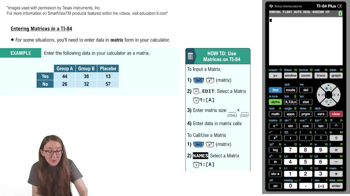
Using Matrices on a TI-84
15 Termini
13. Chi-Square Tests & Goodness of Fit - Part 1 of 2
3 Argomenti
17 Problemi
Capitolo
Brendan
13. Chi-Square Tests & Goodness of Fit - Part 2 of 2
1 Argomento
3 Problemi
Capitolo
David-Paige
VideoThumbView.guidedCourse
02:22
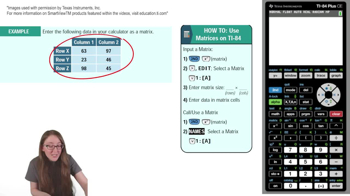
Using Matrices on a TI-84 Example 1
82
views
VideoThumbView.guidedCourse
03:56
Using Matrices on a TI-84
119
views
Termini in questo insieme (15)
Nascondere definizioni
What is the first step to access the matrix menu on a TI-84 calculator?
Press the 'second' button, then the 'x^-1' button, which has 'matrix' above it.
How do you navigate to the edit menu for matrices on the TI-84?
Scroll right to the 'edit' menu and press 'enter' when over the desired matrix option.
Why is it important to match the matrix dimensions to your data table?
Matching dimensions ensures each value from the table corresponds to the correct cell in the matrix, maintaining data integrity.
What do the two numbers you enter for matrix dimensions represent?
The first number is the number of rows, and the second is the number of columns in the matrix.
How do you input values into a matrix on the TI-84?
Enter each value into the corresponding cell, pressing 'enter' to move to the next cell.
What should you do after entering all data into the matrix?
Double-check that all values in the matrix match the corresponding cells in your data table.
How do you return to the main viewing window after editing a matrix?
Press 'second' and then 'mode', which has 'quit' above it, to return to the main window.
What steps are needed to call a matrix from the main viewing window?
Press 'second' and 'x^-1' to access the matrix menu, select the matrix under 'names', and press 'enter'.
How can you verify you have selected the correct matrix to call?
Check the matrix's dimensions displayed next to its name in the menu.
What happens when you press 'enter' after selecting a matrix to call?
The matrix appears in the viewing window, showing all its values.
Why is accurate matrix input essential for statistical methods?
Accurate input ensures correct application of methods like ANOVA and chi-square tests, supporting reliable analyses.
How do matrix operations enhance understanding of data structures?
They facilitate calculations related to probability models, expected values, and experimental design.
What types of statistical analyses can matrices support on the TI-84?
Matrices support analyses such as contingency tables and categorical data evaluation.
How does mastery of matrix operations benefit business and scientific contexts?
It enables effective data mining and predictive analytics by structuring and analyzing complex data.
What is a good practice after entering a matrix for calculations?
Review the matrix to ensure all values are correct before proceeding with further calculations.
 IndietroIndietro

 02:22
02:22