Skip to main content
Introductory Statistics
Il mio corso
Impara
Preparazione agli esami
AI Tutor
Guide di studio
Soluzioni per libri di testo
Flashcard
Esplora
Prova l'app
Il mio corso
Impara
Preparazione agli esami
AI Tutor
Guide di studio
Soluzioni per libri di testo
Flashcard
Esplora
Prova l'app
Indietro
Finding Poisson Probabilities-Excel quiz
Puoi toccare per girare la carta.
What is the purpose of the =POISSON.DIST function in Excel?
Puoi toccare per girare la carta.
👆
What is the purpose of the =POISSON.DIST function in Excel?
It is used to calculate Poisson probabilities for a given number of occurrences and mean rate.
Avanzamenti del tracciato
I pulsanti di controllo sono stati cambiati in modalità "navigazione".
1/15
Flashcard correlate
Pratica correlata
Video consigliati
Finding Poisson Probabilities-Excel definitions
Finding Poisson Probabilities-Excel
15 Termini
Hypergeometric Distribution
5. Binomial Distribution & Discrete Random Variables
5 Problemi
Argomento
Laura
5. Binomial Distribution & Discrete Random Variables
4 Argomenti
12 Problemi
Capitolo
Ernest
VideoThumbView.guidedCourse
07:41
Finding Poisson Probabilities-Excel
333
views
6
rank
VideoThumbView.guidedCourse
07:42
Finding Poisson Probabilities-Excel Example 1
234
views
9
rank
Termini in questo insieme (15)
Nascondere definizioni
What is the purpose of the =POISSON.DIST function in Excel?
It is used to calculate Poisson probabilities for a given number of occurrences and mean rate.
What are the three arguments required by the =POISSON.DIST function?
The three arguments are x (number of occurrences), mean (average rate, lambda), and cumulative (true or false).
What does setting the cumulative argument to FALSE in =POISSON.DIST do?
It finds the probability that x is exactly equal to a specific value.
What does setting the cumulative argument to TRUE in =POISSON.DIST do?
It calculates the probability that x is less than or equal to a specific value.
How do you find the probability that x is greater than a value using =POISSON.DIST?
You use the complement rule: 1 minus the cumulative probability for x less than or equal to that value.
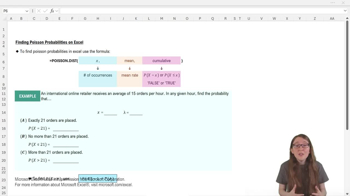
In the example, what is the mean rate (lambda) for the online retailer problem?
The mean rate (lambda) is 15 orders per hour.
How would you write the Excel formula to find the probability of exactly 21 orders?
You would use =POISSON.DIST(21, 15, FALSE).
How would you write the Excel formula to find the probability of no more than 21 orders?
You would use =POISSON.DIST(21, 15, TRUE).
If you want to find the probability of more than 21 orders, which Excel operation would you use?
You would use 1 minus the cumulative probability: 1 - =POISSON.DIST(21, 15, TRUE).
Why is the order of arguments important in =POISSON.DIST?
Because Excel expects the arguments in a specific order: x, mean, cumulative.
What does the complement rule state in probability?
It states that the probability of an event is 1 minus the probability of its complement (opposite event).
What is the approximate probability of exactly 21 orders in the example?
It is approximately 0.03, or about a 3% chance.
What is the approximate probability of no more than 21 orders in the example?
It is approximately 0.95, or about a 95% chance.
What is the approximate probability of more than 21 orders in the example?
It is approximately 0.05, or about a 5% chance.
Why do the probabilities for x ≤ 21 and x > 21 add up to 1?
Because they are complementary events, and the sum of their probabilities must equal 1.
 IndietroIndietro

 07:41
07:41