Skip to main content
Statistics for Business
나의 코스
배우기
시험 준비
AI 튜터
학습 가이드
플래시카드
탐험해 보세요
앱을 사용해 보세요
나의 코스
배우기
시험 준비
AI 튜터
학습 가이드
플래시카드
탐험해 보세요
앱을 사용해 보세요
뒤로
Finding Binomial Probabilities-Excel definitions
카드를 뒤집기 위해 탭할 수 있습니다.
Binomial Probability
카드를 뒤집기 위해 탭할 수 있습니다.
👆
Binomial Probability
Chance of a specific number of successes in a fixed number of independent trials, each with the same likelihood of success.
진행 상황 추적
컨트롤 버튼이 '내비게이션' 모드로 변경되었습니다.
1/14
관련 플래시카드
관련 실천
추천 영상
Finding Binomial Probabilities-Excel quiz
Finding Binomial Probabilities-Excel
15 용어
Poisson Distribution
5. Binomial Distribution & Discrete Random Variables
4 문제점
주제
Ernest
5. Binomial Distribution & Discrete Random Variables - Part 1 of 2
3 주제
15 문제점
장
Ernest
5. Binomial Distribution & Discrete Random Variables - Part 2 of 2
1 주제
3 문제점
장
David-Paige
08:48
Finding Binomial Probabilities Example 1
121
views
5
rank
08:48
Finding Binomial Probabilities
193
views
5
rank
이 집합의 용어 (14)
하이드의 정의
Binomial Probability
Chance of a specific number of successes in a fixed number of independent trials, each with the same likelihood of success.
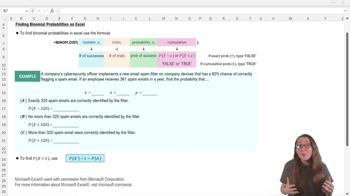
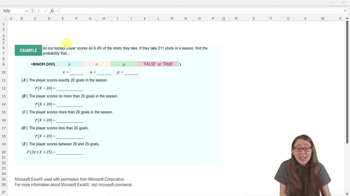
BINOM.DIST Function
Excel tool that calculates either exact or cumulative binomial probabilities using four required arguments.
Number of Successes
Desired count of positive outcomes in a binomial experiment, often represented as x in calculations.
Number of Trials
Total attempts or observations in a binomial setting, typically denoted as n.
Probability of Success
Likelihood that a single trial results in a positive outcome, expressed as a decimal value.
Exact Probability
Chance that the number of successes equals a specific value, found by setting the cumulative argument to FALSE.
Cumulative Probability
Chance that the number of successes is less than or equal to a value, calculated by setting the cumulative argument to TRUE.
Complement Rule
Method for finding the probability of an event by subtracting the probability of its opposite from one.
Arguments
Inputs required by a function, such as number of successes, trials, probability, and cumulative indicator in Excel.
Formula Bar
Excel workspace area where functions and calculations are entered or edited.
Decimal Equivalent
Numeric representation of a percentage as a value between 0 and 1, used for probability calculations.
Cell Reference
Excel notation that points to a specific location in a worksheet, allowing dynamic use of values in calculations.
Sanity Check
Quick verification step to ensure calculated probabilities make logical sense, such as confirming complements sum to one.
Cumulative Indicator
Fourth argument in BINOM.DIST that specifies whether to compute exact or cumulative probability.
 뒤로뒤로
뒤로뒤로

 08:48
08:48