Skip to main content
Introductory Statistics
나의 코스
배우기
시험 준비
AI 튜터
학습 가이드
교과서적 해결책
플래시카드
탐험해 보세요
앱을 사용해 보세요
나의 코스
배우기
시험 준비
AI 튜터
학습 가이드
교과서적 해결책
플래시카드
탐험해 보세요
앱을 사용해 보세요
뒤로
Finding Poisson Probabilities-Excel quiz
카드를 뒤집기 위해 탭할 수 있습니다.
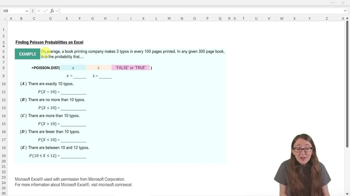
What is the purpose of the =POISSON.DIST function in Excel?
카드를 뒤집기 위해 탭할 수 있습니다.
👆
What is the purpose of the =POISSON.DIST function in Excel?
It is used to calculate Poisson probabilities for a given number of occurrences and mean rate.
진행 상황 추적
컨트롤 버튼이 '내비게이션' 모드로 변경되었습니다.
1/15
관련 플래시카드
관련 실천
추천 영상
Finding Poisson Probabilities-Excel definitions
Finding Poisson Probabilities-Excel
15 용어
Hypergeometric Distribution
5. Binomial Distribution & Discrete Random Variables
5 문제점
주제
Laura
5. Binomial Distribution & Discrete Random Variables
4 주제
12 문제점
장
Ernest
VideoThumbView.guidedCourse
07:41
Finding Poisson Probabilities-Excel
269
views
4
rank
VideoThumbView.guidedCourse
07:42
Finding Poisson Probabilities-Excel Example 1
190
views
7
rank
이 집합의 용어 (15)
하이드의 정의
What is the purpose of the =POISSON.DIST function in Excel?
It is used to calculate Poisson probabilities for a given number of occurrences and mean rate.
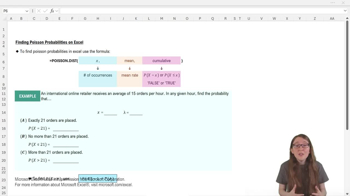
What are the three arguments required by the =POISSON.DIST function?
The three arguments are x (number of occurrences), mean (average rate, lambda), and cumulative (true or false).
What does setting the cumulative argument to FALSE in =POISSON.DIST do?
It finds the probability that x is exactly equal to a specific value.
What does setting the cumulative argument to TRUE in =POISSON.DIST do?
It calculates the probability that x is less than or equal to a specific value.
How do you find the probability that x is greater than a value using =POISSON.DIST?
You use the complement rule: 1 minus the cumulative probability for x less than or equal to that value.
In the example, what is the mean rate (lambda) for the online retailer problem?
The mean rate (lambda) is 15 orders per hour.
How would you write the Excel formula to find the probability of exactly 21 orders?
You would use =POISSON.DIST(21, 15, FALSE).
How would you write the Excel formula to find the probability of no more than 21 orders?
You would use =POISSON.DIST(21, 15, TRUE).
If you want to find the probability of more than 21 orders, which Excel operation would you use?
You would use 1 minus the cumulative probability: 1 - =POISSON.DIST(21, 15, TRUE).
Why is the order of arguments important in =POISSON.DIST?
Because Excel expects the arguments in a specific order: x, mean, cumulative.
What does the complement rule state in probability?
It states that the probability of an event is 1 minus the probability of its complement (opposite event).
What is the approximate probability of exactly 21 orders in the example?
It is approximately 0.03, or about a 3% chance.
What is the approximate probability of no more than 21 orders in the example?
It is approximately 0.95, or about a 95% chance.
What is the approximate probability of more than 21 orders in the example?
It is approximately 0.05, or about a 5% chance.
Why do the probabilities for x ≤ 21 and x > 21 add up to 1?
Because they are complementary events, and the sum of their probabilities must equal 1.
 뒤로뒤로
뒤로뒤로

 07:41
07:41