Skip to main content
Introductory Statistics
나의 코스
배우기
시험 준비
AI 튜터
학습 가이드
교과서적 해결책
플래시카드
탐험해 보세요
앱을 사용해 보세요
나의 코스
배우기
시험 준비
AI 튜터
학습 가이드
교과서적 해결책
플래시카드
탐험해 보세요
앱을 사용해 보세요
뒤로
Using Matrices on a TI-84 quiz
카드를 뒤집기 위해 탭할 수 있습니다.
What is the first step to access the matrix menu on a TI-84 calculator?
카드를 뒤집기 위해 탭할 수 있습니다.
👆
What is the first step to access the matrix menu on a TI-84 calculator?
Press the '2nd' button, then the 'x^-1' button (which has 'MATRIX' above it) to access the matrix menu.
진행 상황 추적
컨트롤 버튼이 '내비게이션' 모드로 변경되었습니다.
1/15
관련 플래시카드
관련 실천
추천 영상
Using Matrices on a TI-84 definitions
Using Matrices on a TI-84
15 용어
13. Chi-Square Tests & Goodness of Fit
4 주제
5 문제점
장
VideoThumbView.guidedCourse
02:22
Using Matrices on a TI-84 Example 1
150
views
3
rank
VideoThumbView.guidedCourse
03:56
Using Matrices on a TI-84
198
views
4
rank
이 집합의 용어 (15)
하이드의 정의
What is the first step to access the matrix menu on a TI-84 calculator?
Press the '2nd' button, then the 'x^-1' button (which has 'MATRIX' above it) to access the matrix menu.
How do you navigate to the edit menu for matrices on the TI-84?
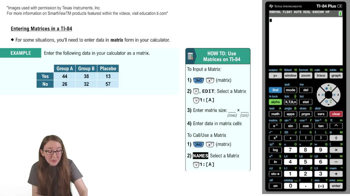
Scroll right to the 'EDIT' menu after entering the matrix menu, then press 'ENTER' on the matrix you want to edit.
What information must you enter to define the size of a matrix on the TI-84?
You must enter the number of rows first, followed by the number of columns to match your data table.
Why is it important to match the matrix dimensions to your data table?
Matching dimensions ensures that each value from your data table corresponds to the correct cell in the matrix.
How do you enter data into a matrix once its size is set on the TI-84?
Input each value in the matrix, pressing 'ENTER' after each entry to move to the next cell.
What should you do after entering all your data into the matrix?
Double-check that all values in the matrix match the corresponding cells in your data table.
How do you return to the main viewing window from the matrix editor on the TI-84?
Press '2nd' and then 'MODE' (which has 'QUIT' above it) to return to the main viewing window.
What steps are needed to call or use a matrix from the main viewing window?
Press '2nd' and 'x^-1' to access the matrix menu, select the matrix by name, and press 'ENTER' to display it.
How can you verify you have selected the correct matrix to call?
Check the matrix's dimensions displayed next to its name in the matrix menu.
What happens when you press 'ENTER' after selecting a matrix to call?
The matrix appears in the viewing window, showing all its values.
Why is accurate data entry into matrices important for statistical analysis?
Accurate entry ensures correct alignment of data, which is crucial for valid calculations and analysis.
How does using matrices on a TI-84 support statistical tasks like regression?
Matrices organize data efficiently, making it easier to perform calculations such as regression and variance analysis.
What statistical concept can be better understood by mastering matrix operations?
Mastery of matrix operations enhances understanding of concepts like the coefficient of variation.
How does the TI-84 matrix feature facilitate handling categorical data?
It allows you to organize and manipulate categorical data in a structured format for analysis.
What is a recommended practice after entering a matrix before using it for calculations?
Review the matrix to ensure all values are correct and correspond to the original data table.
 뒤로뒤로
뒤로뒤로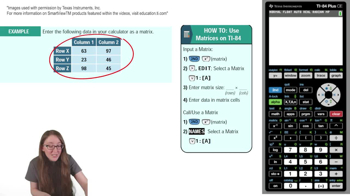
 02:22
02:22