 Back
BackAssociation Between Categorical Variables: Contingency Tables, Lurking Variables, and Strength of Association
Study Guide - Smart Notes
 Tailored notes based on your materials, expanded with key definitions, examples, and context.
Association Between Categorical Variables
Contingency Tables
Contingency tables are fundamental tools in business statistics for analyzing the relationship between two categorical variables. They display the frequency of cases for each combination of categories, allowing for the examination of possible associations.
Definition: A contingency table shows counts of cases for each combination of two categorical variables.
Cells: Each cell represents a unique combination and is mutually exclusive.
Marginal Distributions: Totals for each variable, found in the table's margins.
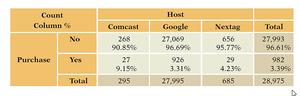
Conditional Distributions: Frequencies within a row or column, restricted to cases meeting a specific condition.
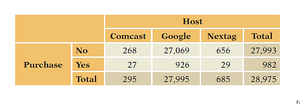
Application: Used to determine if variables such as 'Host' and 'Purchase' are associated.
Visualizing Associations
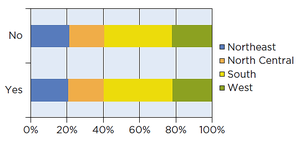
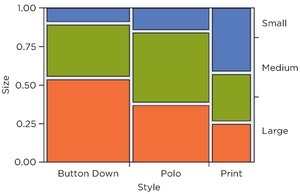
Visual tools such as stacked bar charts and mosaic plots help illustrate associations or lack thereof between categorical variables.
Stacked Bar Charts: Display conditional distributions by dividing bars proportionally according to group percentages.
Mosaic Plots: Represent cell counts with tile sizes proportional to frequency, providing a visual sense of association.
Lurking Variables and Simpson’s Paradox
Lurking Variables
A lurking variable is a hidden factor that influences the apparent relationship between two other variables, potentially leading to misleading conclusions.
Definition: A concealed variable affecting the observed association.
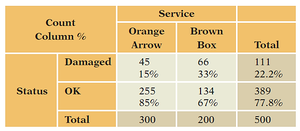
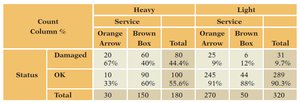
Example: Shipping service appears better until adjusted for package weight.
Simpson’s Paradox
Simpson’s Paradox occurs when the association between two variables reverses or changes after accounting for a third variable.
Definition: Change in association when data are separated by a third variable.
Application: Important in business statistics to avoid incorrect causal interpretations.
Strength of Association
Chi-Squared Statistic
The chi-squared statistic is a measure used to assess the strength of association between categorical variables in a contingency table.
Definition: Compares observed counts to expected counts under the assumption of no association.
Calculation: Accumulates squared deviations between observed and expected counts across all cells.
Formula:
Where O = observed count, E = expected count.

Preparing Data for Analysis
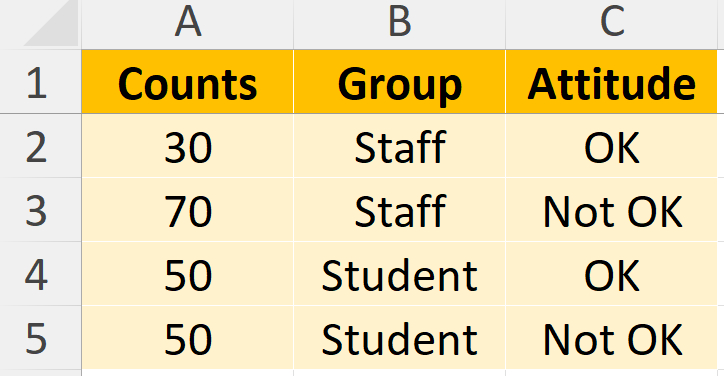
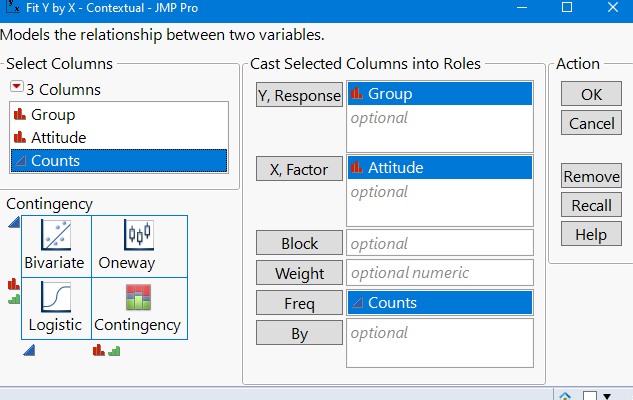
Data must be formatted correctly for statistical software analysis, such as JMP. Each count and its related information should be represented in a single row, and totals should be removed.
Step 1: Remove total rows and columns.
Step 2: Structure data so each row contains a count and its associated variables.
Cramer’s V
Cramer’s V is a normalized measure of association derived from the chi-squared statistic, ranging from 0 (no association) to 1 (perfect association).
Definition: Quantifies the strength of association between categorical variables.
Formula:
Where is the chi-squared statistic, is the total number of observations, is the number of rows, and is the number of columns.
Checklist for Chi-Squared and Cramer’s V
Verify that variables are categorical.
Check for lurking variables before interpreting association.
Summary Table Examples
Contingency Table Example: Web Shopping
Host | Comcast | Nextag | Total | |
|---|---|---|---|---|
No | 268 | 27,069 | 656 | 27,993 |
Yes | 27 | 926 | 29 | 982 |
Total | 295 | 27,995 | 685 | 28,975 |
Conditional Distribution Example: Web Shopping
Host | Comcast | Nextag | Total | |
|---|---|---|---|---|
No | 268 (90.85%) | 27,069 (96.66%) | 656 (95.77%) | 27,993 (96.61%) |
Yes | 27 (9.15%) | 926 (3.31%) | 29 (4.23%) | 982 (3.39%) |
Total | 295 | 27,995 | 685 | 28,975 |
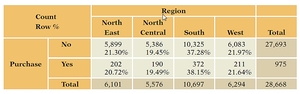
Contingency Table Example: Purchase by Region
Region | North East | North Central | South | West | Total |
|---|---|---|---|---|---|
No | 5,899 (21.30%) | 5,386 (19.45%) | 10,325 (37.28%) | 6,083 (21.97%) | 27,693 |
Yes | 202 (20.72%) | 190 (19.49%) | 372 (38.15%) | 211 (21.64%) | 975 |
Total | 6,101 | 5,576 | 10,697 | 6,294 | 28,668 |
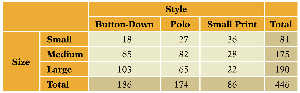
Contingency Table Example: Shirt Size by Style
Style | Button-Down | Polo | Small Print | Total |
|---|---|---|---|---|
Small | 19 | 27 | 35 | 81 |
Medium | 65 | 82 | 28 | 175 |
Large | 103 | 65 | 22 | 190 |
Total | 187 | 174 | 86 | 447 |
Contingency Table Example: Service Status
Service | Orange Arrow | Brown Box | Total |
|---|---|---|---|
Damaged | 45 (15%) | 66 (33%) | 111 (22.2%) |
OK | 255 (85%) | 134 (67%) | 389 (77.8%) |
Total | 300 | 200 | 500 |
Contingency Table Example: Service Status by Weight
Heavy | Light | |||||
|---|---|---|---|---|---|---|
Service | Orange Arrow | Brown Box | Total | Orange Arrow | Brown Box | Total |
Damaged | 20 (67%) | 60 (40%) | 80 (44.4%) | 25 (9%) | 6 (12%) | 31 (9.7%) |
OK | 10 (33%) | 90 (60%) | 100 (55.6%) | 245 (91%) | 44 (88%) | 289 (90.3%) |
Total | 30 | 150 | 180 | 270 | 50 | 320 |
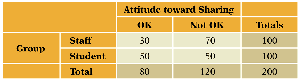
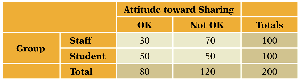
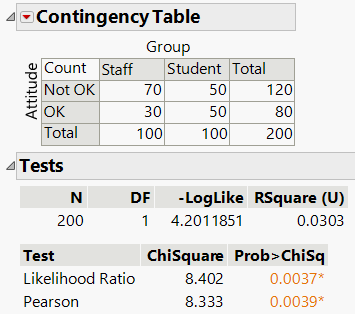
Contingency Table Example: Attitude Toward Sharing
Group | OK | Not OK | Totals |
|---|---|---|---|
Staff | 30 | 70 | 100 |
Student | 50 | 50 | 100 |
Total | 80 | 120 | 200 |
Observed vs Expected Counts Example
Real Data | Expected | Difference |
|---|---|---|
30 | 40 | 10 |
70 | 60 | 10 |
50 | 40 | 10 |
50 | 80 | -10 |
Checklist for Statistical Tests
Ensure variables are categorical.
Check for lurking variables before interpreting results.
Additional info: These notes expand on the original slides and tables, providing definitions, formulas, and context for business statistics students. All images included are directly relevant to the explanation of their adjacent paragraphs.
