 Back
BackChapter 3: Calculating Descriptive Statistics – Business Statistics Study Notes
Study Guide - Smart Notes
 Tailored notes based on your materials, expanded with key definitions, examples, and context.
Chapter 3: Calculating Descriptive Statistics
3.1 Measures of Central Tendency
Measures of central tendency are statistical values that describe the center point or typical value of a dataset. The main measures include the mean, median, mode, and weighted mean.
Mean
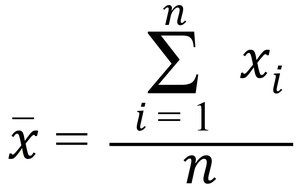
Definition: The mean (or average) is the sum of all values divided by the number of observations.
Sample Mean Formula:



The formula for the sample mean is:
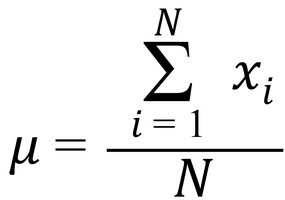
Population Mean Formula:
Example: For the sample values 87.2, 118.9, 76.2, 107.7, 61.5, the sample mean is:

Weighted Mean
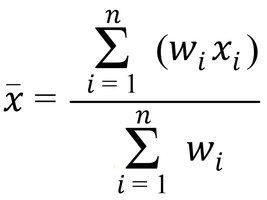
Definition: The weighted mean assigns different weights to values, reflecting their relative importance.
Formula:
Example: Suppose your statistics grade is based on an exam, project, and homework with different weights.
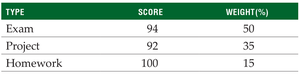
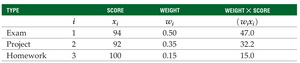
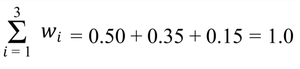

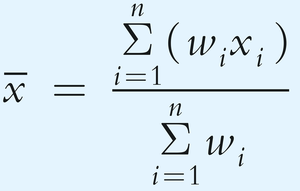

The weighted mean is:
Median
Definition: The median is the middle value when data are arranged in ascending order. If the number of values is even, it is the average of the two middle values.
Calculation: Use the index point , rounding up if not a whole number.
Example: For n = 9, the median is the 5th value in the sorted list.

Mode
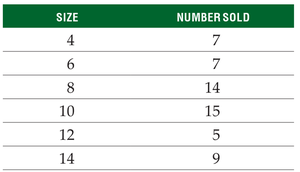
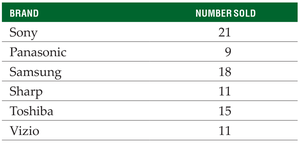
Definition: The mode is the value that appears most frequently in a dataset. There can be more than one mode or none at all.
Example (Numerical Data):
Example (Categorical Data):
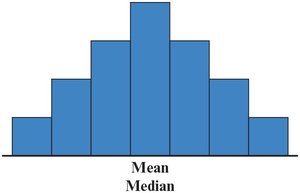
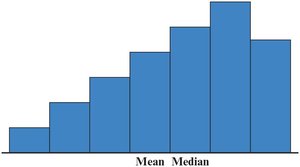
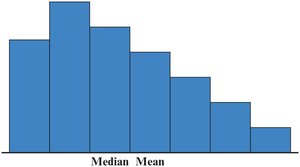
Shapes of Frequency Distributions
Symmetric: Mean = Median
Right-Skewed: Mean > Median
Left-Skewed: Mean < Median
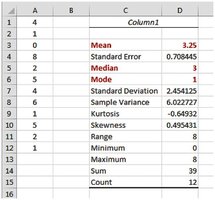
Using Excel for Central Tendency
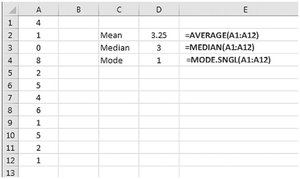
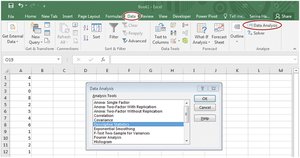
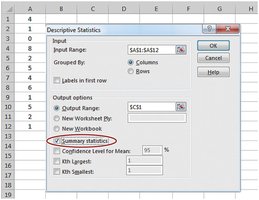
Excel functions: AVERAGE, MEDIAN, MODE.SNGL
Excel may not always identify all modes or handle categorical data for mode.
Choosing the Appropriate Measure
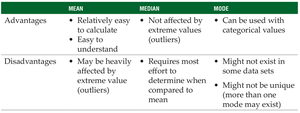
Mean: Use when data are symmetric and without outliers.
Median: Use when data are skewed or contain outliers.
Mode: Use for categorical data.
3.2 Measures of Variability
Measures of variability describe the spread or dispersion of data values. Common measures include range, variance, and standard deviation.
Range
Definition: The range is the difference between the highest and lowest values in a dataset.
Formula: Range = Highest value – Lowest value
Advantage: Simple to calculate.
Disadvantage: Only considers two values and is sensitive to outliers.
Variance and Standard Deviation
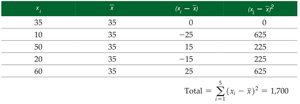
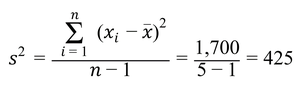
Variance: Measures the average squared deviation from the mean.
Sample Variance Formula:
Standard Deviation: The square root of the variance, with the same units as the original data.
Sample Standard Deviation Formula:

Population Variance and Standard Deviation
Population Variance Formula:
Population Standard Deviation Formula:




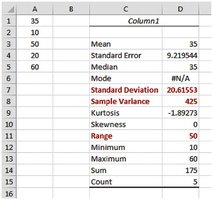
Excel for Variability
Sample: =VAR.S(), =STDEV.S()
Population: =VAR.P(), =STDEV.P()
3.3 Using the Mean and Standard Deviation Together
The mean and standard deviation are often used together to describe the center and spread of data, especially in quality control and business applications.
Coefficient of Variation (CV)
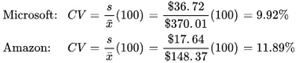
Definition: The CV expresses the standard deviation as a percentage of the mean, allowing comparison of variability between datasets with different units or means.
Formula (Sample):
Formula (Population):
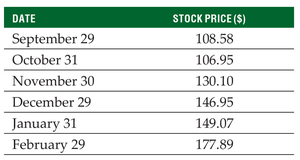
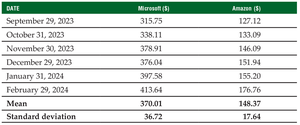
Example: Comparing Microsoft and Amazon stock price variability.
z-Score
Definition: The z-score indicates how many standard deviations a value is from the mean.
Formula (Sample):
Formula (Population):
Interpretation: z = 0 (at mean), z > 0 (above mean), z < 0 (below mean). Outliers typically have |z| > 3.
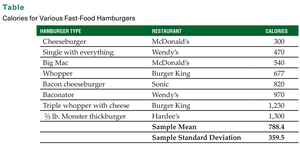
Example: Calculating z-score for a hamburger calorie value.

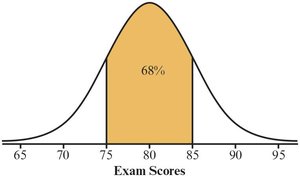
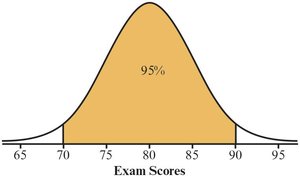
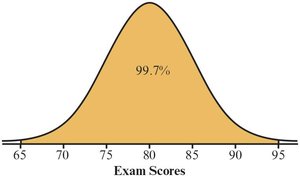
The Empirical Rule
For bell-shaped (normal) distributions:
~68% of values within ±1 standard deviation
~95% within ±2 standard deviations
~99.7% within ±3 standard deviations
3.4 Working with Grouped Data
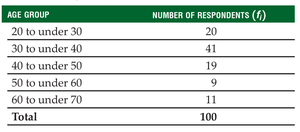
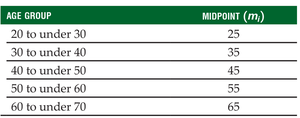
When data are grouped into frequency distributions, the mean and variance can be estimated using class midpoints and frequencies.
Mean of Grouped Data
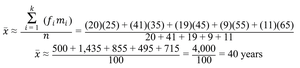
Formula (Sample):
Where: = frequency of class i, = midpoint of class i, = total observations, = number of classes
Example: Calculating mean age from grouped survey data.
3.5 Measures of Relative Position
These measures compare the position of a value relative to the rest of the data, including percentiles, quartiles, and the interquartile range (IQR).
Percentiles
Definition: The pth percentile is the value below which p% of the data fall.
Calculation: Sort data, compute index .
Quartiles
Q1: 25th percentile
Q2: 50th percentile (median)
Q3: 75th percentile
Interquartile Range (IQR)
Definition: IQR = Q3 – Q1; describes the spread of the middle 50% of data.
Box-and-Whisker Plots
Graphical summary showing quartiles, minimum, maximum, and outliers.
Outliers
Values outside Q1 – 1.5(IQR) or Q3 + 1.5(IQR) are considered outliers.
3.6 Measures of Association Between Two Variables
These statistics describe the relationship between two variables, including covariance and correlation.
Sample Covariance
Definition: Measures the direction of the linear relationship between two variables.
Formula:
Sample Correlation Coefficient
Definition: Measures both the strength and direction of the linear relationship between two variables.
Formula:
Range: -1 (perfect negative) to +1 (perfect positive); 0 means no linear relationship.
Additional info: These notes cover all major descriptive statistics relevant to business statistics, including formulas, examples, and Excel applications. For further study, refer to the textbook for more detailed examples and practice problems.
