 Back
BackScientific Computing I: Foundational Concepts for College Algebra Students
Study Guide - Smart Notes
 Tailored notes based on your materials, expanded with key definitions, examples, and context.
Introduction to Programming and Algorithms
Definition and Importance of Algorithms
An algorithm is a step-by-step description of a set of instructions to be executed in a certain order to achieve a desired output. Algorithms must be precise and effective, ensuring clarity and feasibility in execution. In scientific computing, algorithms are essential for solving mathematical and computational problems using computers.
Programming Languages
Programming involves expressing an algorithm in a form that a computer can interpret. Common programming languages include Python, Fortran, C, Matlab, and Julia. Python is a high-level, general-purpose language widely used for mathematical problem-solving due to its ease of use and cross-platform compatibility.
Python Environment Setup
Installing Python with Anaconda
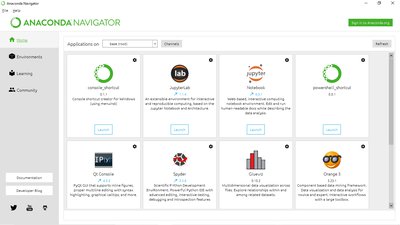
Anaconda is a free, open-source distribution that includes Python and many scientific libraries. It provides integrated development environments (IDEs) such as Jupyter Notebook and Spyder, which facilitate coding and data analysis.

Alternative Programming Environments
Google Colab: A web-based IDE for Python, useful for those with steady internet access.
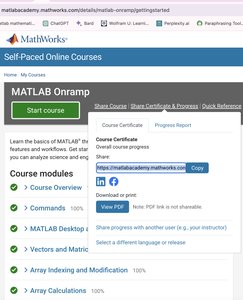
Matlab: Powerful for numerical computation and linear programming. Students are encouraged to complete the "MATLAB Onramp" course for foundational skills.
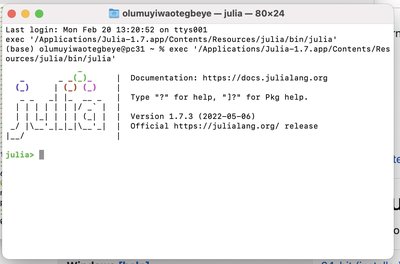
Julia: An open-source language optimized for numerical computing, recommended for enthusiasts.
Basic Python Concepts
Operators and Order of Operations
Arithmetic Operators: + (addition), - (subtraction), * (multiplication), / (division), ** (exponentiation), % (modulus), // (floor division).
Order of Operations: Python follows PEMDAS (Parentheses, Exponents, Multiplication/Division, Addition/Subtraction).
Variables and Assignment Statements
Variables: Used to store values for later use. Naming rules include starting with a letter or underscore, case sensitivity, and using only alphanumeric characters and underscores.
Assignment: Syntax is variable = expression. Values can be updated by reassigning.
Expressions and Statements
Expression: Combination of values, variables, and operators.
Statement: A unit of code executed by the interpreter. Multiple statements form a script.
Data Types in Python
Common Data Types
String (str): Text data, enclosed in quotes.
Integer (int): Whole numbers.
Float (float): Decimal numbers.
Boolean (bool): True or False values.
List (list): Collections of items, can include mixed data types.
Type Conversion
Conversion between types is possible using functions like int(), float(), and str().
Print Statements
print() displays values and expressions. Supports formatted output using f-strings and format() method.
String Operations
Indexing: Access individual characters by position.
Slicing: Extract substrings using [start:stop].
Concatenation: Combine strings with +.
Duplication: Repeat strings with *.
Length: Use len() to find string length.
List Operations
Indexing and Slicing: Similar to strings, but lists can contain any data type.
Concatenation: Combine lists with +.
Append and Remove: Add items with .append(), remove with .remove().
Conditional Statements
Comparison and Logical Operators
Comparison: ==, !=, <, <=, >, >=
Logical: and, or, not, in
Control Flow Statements
if: Executes block if condition is true.
if-else: Executes alternative block if condition is false.
if-elif-else: Handles multiple conditions.
Nested if: Allows conditional statements within other conditionals.
Loops
For Loop
Repeats statements for each item in a sequence or for a specified range.
Syntax: for variable in sequence:
While Loop
Repeats statements as long as a condition is true.
Careful updating of loop variables is necessary to avoid infinite loops.
Functions and Modules
Defining Functions
Functions are defined with def keyword and may take arguments.
Functions can return values using return.
Using Modules
Modules provide additional functionality. Common modules include math, numpy, random, scipy, and matplotlib.
Import modules with import module_name.
Input and Output
Input Function
input() prompts the user for input. Type conversion may be necessary for numeric input.
Errors and Error Analysis
Floating-Point Representation
Computers represent real numbers with finite digits, leading to round-off errors.
Numbers are stored in normalized floating-point form:
Chopping and Rounding
Chopping: Truncates digits beyond a certain point.
Rounding: Adjusts the last digit based on the next digit.
Error Measurement
Absolute Error:
Relative Error:
Significant Digits: Number of digits for which the approximation is accurate.
Minimizing Round-Off Error
Careful sequencing of operations or reformulation can reduce errors, e.g., rationalizing the quadratic formula.
Matrices and Vectors
Matrix Definitions and Types
Matrix: Rectangular array of numbers, denoted by capital letters.
Order: Number of rows (m) and columns (n), written as m × n.
Vector: Matrix with one row or one column.
Special matrices: square, column, row, zero, diagonal, identity, triangular, tridiagonal, symmetric.
Matrix Operations
Addition/Subtraction: Element-wise, same order required.
Scalar Multiplication: Multiply each element by a scalar.
Matrix Multiplication: Product exists if columns of first matrix equal rows of second.
Inverse: For square matrices,
Vector Operations
Dot Product:
Norms: Measure magnitude. Common norms: , ,
Iterative Methods for Nonlinear Equations
Overview and Types
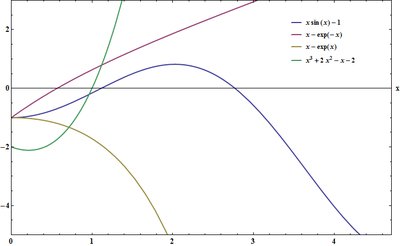
Nonlinear equations are often solved using iterative methods, including interval (bracketing) and fixed point methods. These are essential for equations not solvable analytically.
Rate of Convergence
Linear Convergence: Error decreases proportionally each iteration.
Quadratic Convergence: Error decreases as the square of the previous error, leading to faster convergence.
Interval Methods
Bisection Method
Divides interval in half, selects subinterval containing root based on sign change.
Stopping criteria based on interval length or function value.
Error after n steps:
False Position (Regula Falsi) Method
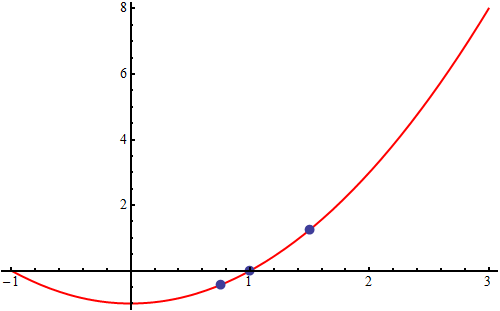
Uses linear interpolation to estimate root, typically faster than bisection.
Formula:
Fixed Point Methods
Rearrange equation to , iterate .
Convergence depends on .
Newton's Method
Uses tangent line at current estimate to find next approximation.
Formula:
Quadratic convergence under suitable conditions.
Summary Table: Matrix Types
Matrix Type | Description | Example |
|---|---|---|
Square Matrix | Same number of rows and columns | 3×3 matrix |
Column Matrix | One column | m×1 |
Row Matrix | One row | 1×n |
Zero Matrix | All entries zero | Any size |
Diagonal Matrix | Non-zero entries only on diagonal | Square matrix |
Identity Matrix | Diagonal matrix with ones | |
Triangular Matrix | Zeros below or above diagonal | Upper/lower triangular |
Tridiagonal Matrix | Non-zero on main, sub, super diagonals | Banded matrix |
Symmetric Matrix | Square matrix |
Conclusion
This guide provides foundational concepts in scientific computing relevant to College Algebra, including programming basics, data types, error analysis, matrix operations, and iterative methods for solving nonlinear equations. Mastery of these topics is essential for further study in algebra, calculus, and computational mathematics.
