 Indietro
Introductory Statistics: Probability, Events, and Contingency Tables – Guided Study Notes
Guida di studio - Note intelligenti
 Appunti personalizzati basati sui tuoi materiali, ampliati con definizioni chiave, esempi e contesto.
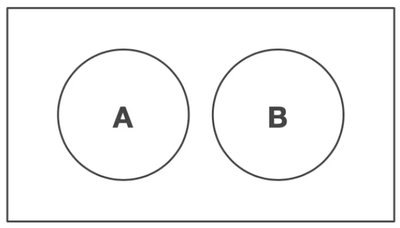
Q6. Describe the relationship between events A and B in the following diagram using probability terminology.
Background
Topic: Probability – Events and Relationships
This question is testing your understanding of how to describe the relationship between two events using set notation and probability language, based on a Venn diagram.
Key Terms and Concepts:
Mutually Exclusive Events: Two events are mutually exclusive if they cannot both occur at the same time (i.e., their intersection is empty).
Intersection (A ∩ B): The set of outcomes that are in both A and B.
Union (A ∪ B): The set of outcomes that are in A, or B, or both.
Step-by-Step Guidance
Observe the Venn diagram: Notice that circles A and B do not overlap at all.
Recall that if two events do not overlap, their intersection is empty: .
In probability terms, this means .
Think about the definition of mutually exclusive events and whether it applies to this diagram.
Try solving on your own before revealing the answer!
Final Answer:
The diagram shows that events A and B are mutually exclusive (or disjoint). This means they cannot both occur at the same time, so .
In probability terminology: "Events A and B are mutually exclusive because their intersection is empty."
Q7. Calculate the conditional probability of events A and B, i.e., , based on the following diagram. Provide an explanation for your response.
Background
Topic: Conditional Probability
This question is testing your ability to use a Venn diagram to determine the conditional probability of one event given another, especially when the events are mutually exclusive.
Key Terms and Formula:
Conditional Probability:
Mutually Exclusive Events: If A and B are mutually exclusive, .
Step-by-Step Guidance
From the diagram, recognize that A and B do not overlap, so .
Recall the formula for conditional probability: .
Substitute into the formula.
Consider what happens to the value of when the numerator is zero.
Try solving on your own before revealing the answer!
Final Answer:
Since , the conditional probability .
This means that if event B occurs, event A cannot occur (they are mutually exclusive).
Q8. Explain whether you should use the Addition Rule or not to calculate based on the following diagram. Provide an explanation for your response.
Background
Topic: Addition Rule for Probability
This question is testing your understanding of when to use the general addition rule versus the simplified addition rule for mutually exclusive events.
Key Terms and Formula:
Addition Rule (General):
Mutually Exclusive Events: If A and B are mutually exclusive, , so .
Step-by-Step Guidance
Look at the diagram and confirm that A and B do not overlap (mutually exclusive).
Recall the general addition rule for any two events.
Recognize that for mutually exclusive events, the intersection term is zero.
Decide whether the simplified addition rule applies in this case.
Try solving on your own before revealing the answer!
Final Answer:
Yes, you should use the simplified addition rule: , because A and B are mutually exclusive (their intersection is zero).
There is no overlap to subtract, so the probability of A or B is just the sum of their individual probabilities.
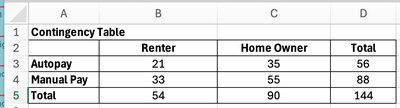
Q13. Write out the steps needed to calculate the marginal probability based on the following contingency table. (Repeat for the joint probability and the conditional probability .)
Background
Topic: Contingency Tables and Probability
This question is testing your ability to use a contingency table to calculate marginal, joint, and conditional probabilities.
Key Terms and Formulas:
Marginal Probability: Probability of a single event, found by summing across a row or column and dividing by the total.
Joint Probability: Probability of two events occurring together, found by dividing the count in the relevant cell by the total.
Conditional Probability: Probability of one event given another, .
Step-by-Step Guidance
To find (marginal probability): - Add the counts for Autopay across both Renter and Home Owner. - Divide this sum by the grand total.
To find (joint probability): - Locate the cell where Autopay and Renter intersect. - Divide this count by the grand total.
To find (conditional probability): - Find the count for Manual Pay and Home Owner. - Divide this by the total number of Home Owners.
Set up each probability as a fraction using the numbers from the table, but do not calculate the final values yet.
Try solving on your own before revealing the answer!
Final Answer:
Each probability is calculated by dividing the relevant count by the appropriate total from the table.
Q14. What spreadsheet formula would you use to calculate the joint probability based on the following contingency table? (Repeat for marginal probability and conditional probability .)
Background
Topic: Probability Calculations Using Spreadsheets
This question is testing your ability to translate probability calculations from a contingency table into spreadsheet formulas.
Key Terms and Spreadsheet Functions:
Joint Probability:
Marginal Probability:
Conditional Probability:
Step-by-Step Guidance
For : - Identify the cell for Manual Pay and Home Owner (cell C4). - Divide this value by the grand total (cell D5).
For : - Use the column total for Home Owner (cell C5). - Divide by the grand total (cell D5).
For : - Use the count for Autopay and Renter (cell B3). - Divide by the row total for Autopay (cell D3).
Write out the spreadsheet formulas using cell references, but do not compute the final values yet.
Try solving on your own before revealing the answer!
Final Answer:
Joint probability: =C4/D5
Marginal probability: =C5/D5
Conditional probability: =B3/D3
Each formula divides the relevant count by the appropriate total, using spreadsheet cell references.
