 Indietro
Organizing and Summarizing Data: Frequency Distributions and Graphical Displays
Guida di studio - Note intelligenti
 Appunti personalizzati basati sui tuoi materiali, ampliati con definizioni chiave, esempi e contesto.
Organizing and Summarizing Data
Frequency Distribution
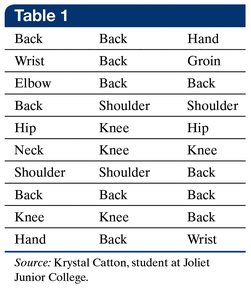
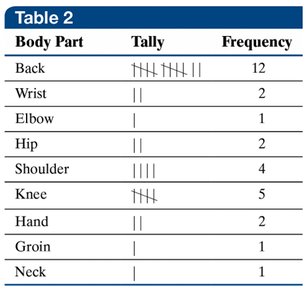
When data is collected from a survey or experiment, it is often in the form of raw data, which is unorganized and difficult to interpret. The first step in data analysis is to organize this data into a frequency distribution, which is a table listing each category and the number of occurrences for each category.
Raw Data: Unorganized data as collected from the source.
Frequency Distribution: A table showing how often each category appears in the dataset.
Example: A physical therapist records the body part requiring rehabilitation for 30 patients. The raw data is organized into a frequency distribution table.
Relative Frequency Distribution
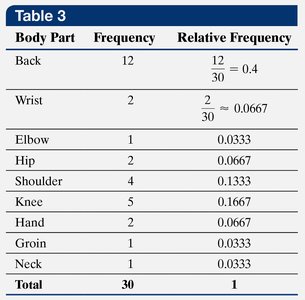
Sometimes, the proportion of each category relative to the whole dataset is more informative than the absolute frequency. The relative frequency is calculated as:
Relative Frequency Formula:
Relative Frequency Distribution: A table listing each category with its relative frequency.
Example: The frequency distribution for body parts is converted to a relative frequency distribution.
Graphical Displays: Bar Charts, Pareto Charts, and Pie Charts
Visual displays help summarize and interpret frequency and relative frequency distributions. Common graphical displays include bar charts, Pareto charts, and pie charts.
Bar Chart
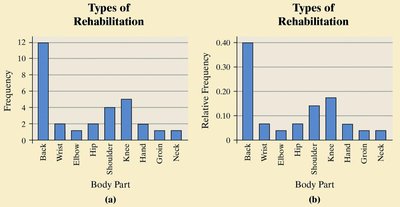
Bar Chart: Uses bars to represent the frequency or relative frequency of each category.
Example: Bar charts for the frequency and relative frequency of body parts requiring rehabilitation.
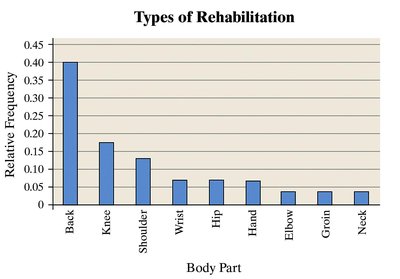
Pareto Chart
Pareto Chart: A bar chart with bars arranged in decreasing order of frequency or relative frequency.
Purpose: Highlights the most common categories.
Example: Pareto chart for body parts requiring rehabilitation.
Pie Chart
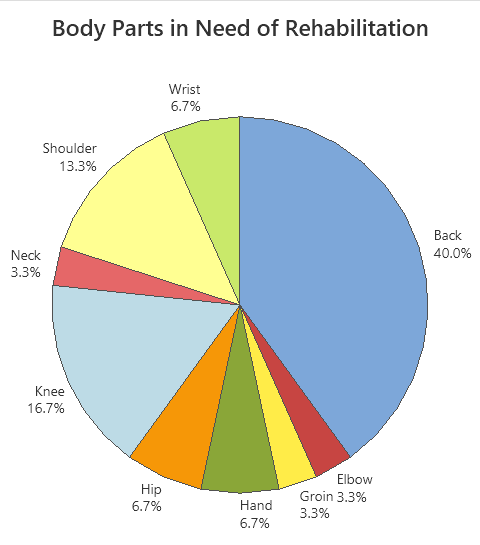
Pie Chart: Represents relative frequencies as slices of a circle, with each slice corresponding to a category.
Example: Pie chart for body parts requiring rehabilitation.
Tabular Data for Discrete Variables
Discrete quantitative data can be organized into tables showing frequency and relative frequency. For example, a survey of desired number of children can be summarized as follows:
Number of Kids | Frequency | Relative Frequency |
|---|---|---|
0 | 7 | 28% |
1 | 4 | 16% |
2 | 6 | 24% |
3 | 3 | 12% |
4 | 2 | 8% |
5 | 1 | 4% |
6 | 1 | 4% |
7 | 1 | 4% |
Dot Plot
A dot plot is a simple graphical display for discrete data, where each observation is represented by a dot above its value on the axis.
Dot Plot: Useful for small datasets and visualizing individual data points.
Stem-and-Leaf Plot
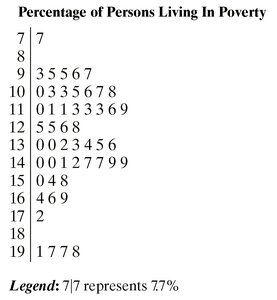
A stem-and-leaf plot organizes data by separating each value into a "stem" (all but the rightmost digit) and a "leaf" (the rightmost digit). This display preserves the original data values and shows their distribution.
Stem: Digits to the left of the rightmost digit.
Leaf: Rightmost digit.
Example: Percentage of persons living in poverty.
Classes and Histograms
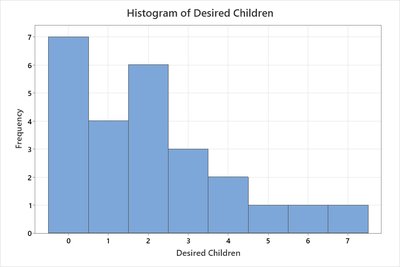
For quantitative data, categories are called classes. Classes may be single values or intervals. Histograms are bar graphs for quantitative data, with bars representing the frequency of each class.
Class: Interval or value grouping quantitative data.
Class Width Formula:
Histogram: Bar graph for quantitative data, with bars touching to indicate continuous intervals.
Shapes of Distributions
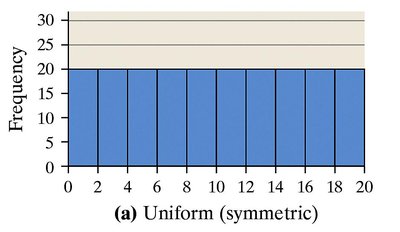
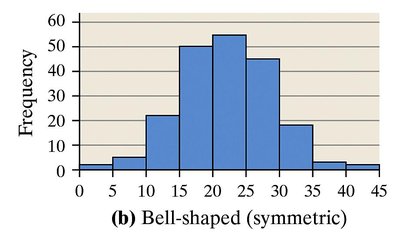
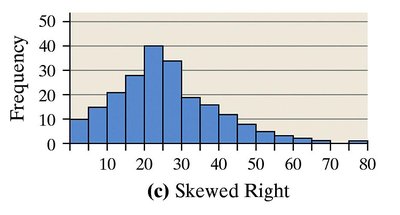
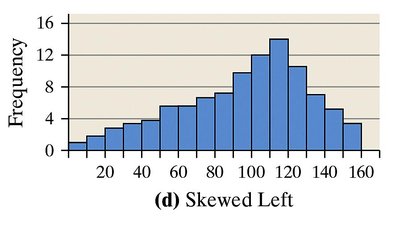
Histograms can reveal the shape of a data distribution. Common shapes include uniform, bell-shaped, skewed-right, and skewed-left.
Uniform Distribution: Frequencies are evenly spread across values.
Bell-Shaped Distribution: Highest frequency in the middle, tapering off at both ends.
Skewed-Right Distribution: Tail extends to the right.
Skewed-Left Distribution: Tail extends to the left.
Best Practices for Visual Displays
To avoid misleading representations, follow these guidelines:
Label axes clearly and include units and data sources.
Avoid distortion and minimize white space.
Do not use 3D charts or multiple designs in one graphic.
Ensure consistent bar widths in bar charts and histograms.
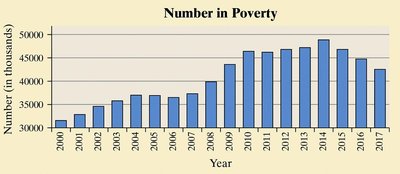
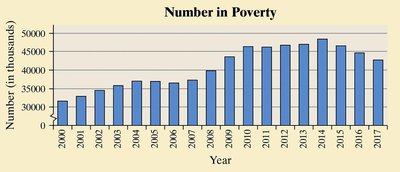
Do not truncate axes unless clearly indicated.
Examples of Misleading and Improved Visual Displays
Inconsistent Labeling: Misleading vs. better labeling.
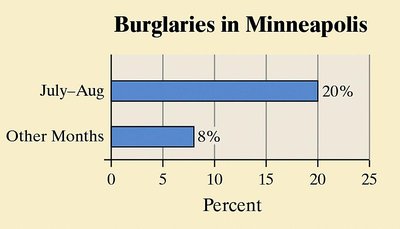
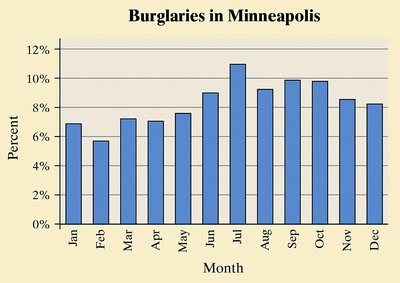
Vertical Axis Not Starting at 0: Misleading vs. better axis scaling.
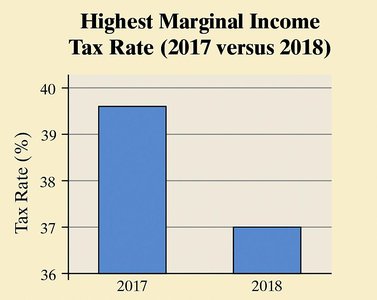
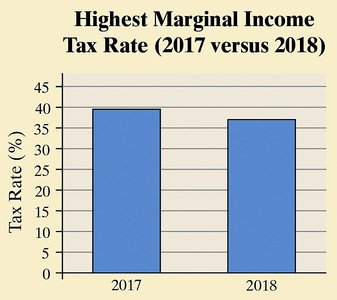
Truncated Axis: Misleading vs. better axis presentation.
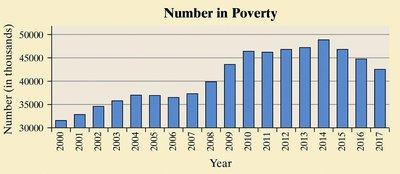
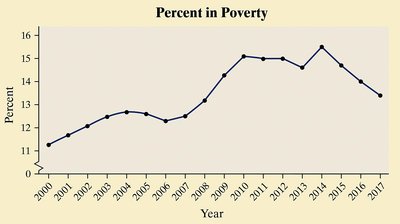
Poor Choice of Visual Display: Misleading vs. improved display.
Disproportioned Display: Misleading vs. better proportioned display.
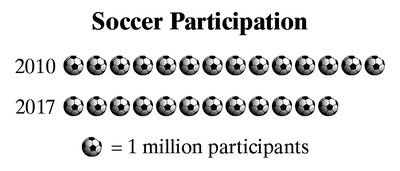
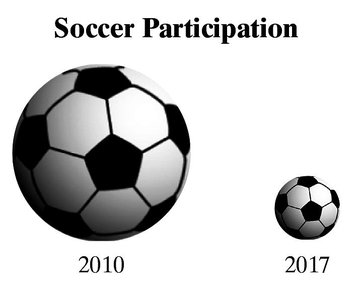
3D Charts: Misleading vs. better 2D chart.
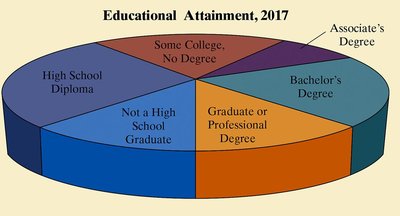
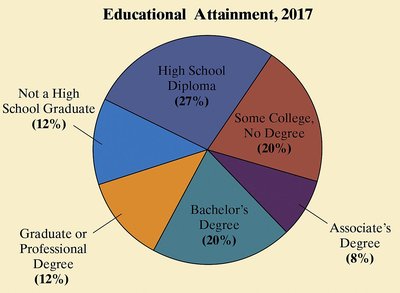
Additional info: These notes cover the essential methods for organizing and summarizing data, including frequency distributions, relative frequency, and graphical displays, as well as best practices for avoiding misleading representations. All examples and images are directly relevant to the explanation of the corresponding paragraph.
