 뒤로
뒤로Chapter 2: Summarizing Data in Tables and Graphs – Introductory Statistics Study Notes
스터디 가이드 - 스마트 노트
 자료에 맞춘 맞춤형 노트, 핵심 정의, 예시, 맥락을 확장해 제공합니다.
Summarizing Data in Tables and Graphs
Introduction
Organizing data is a fundamental step in statistical analysis. Raw data collected from surveys or experiments must be structured to facilitate interpretation and analysis. Data can be organized using tables, graphs, or numerical summaries. This chapter focuses on methods for summarizing both qualitative and quantitative data using various graphical and tabular techniques.
Organizing Qualitative Data
Frequency Distributions
A frequency distribution lists each category of qualitative data and the number of occurrences for each category. This helps to summarize and visualize categorical data efficiently.
Frequency: The count of observations in each category.
Relative Frequency: The proportion or percentage of observations in each category, calculated as:
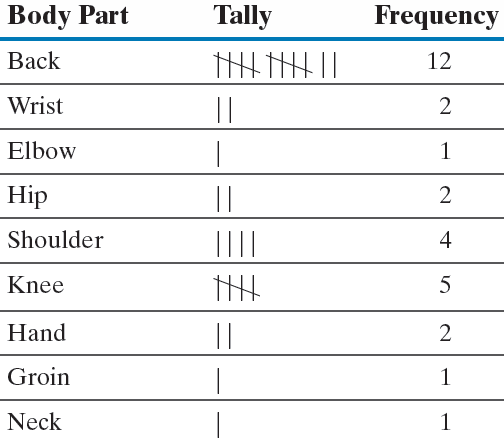
Example: A physical therapist records the body part requiring rehabilitation for 30 patients. The data is summarized in a frequency table.
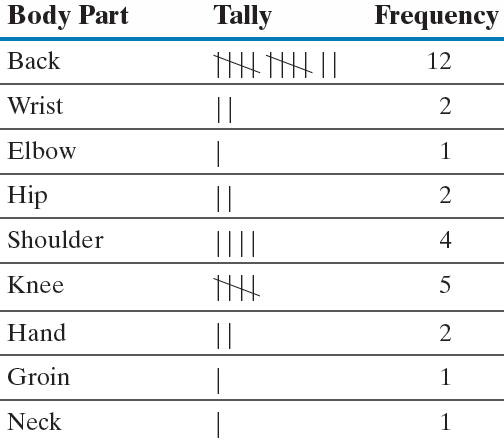
The relative frequency table provides proportions for each category:
Bar Graphs
A bar graph visually represents categorical data. Each category is labeled on one axis, and the frequency or relative frequency is shown on the other axis. Bars are of equal width, and their height corresponds to the frequency or relative frequency.
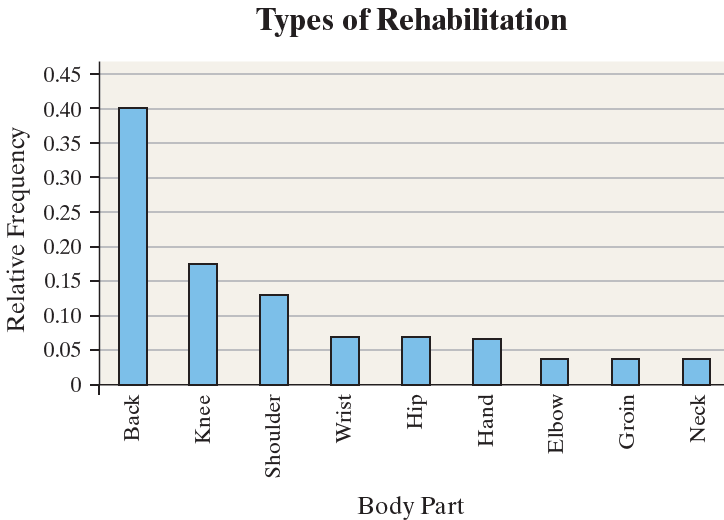
Pareto Chart: A bar graph with bars arranged in decreasing order of frequency or relative frequency.
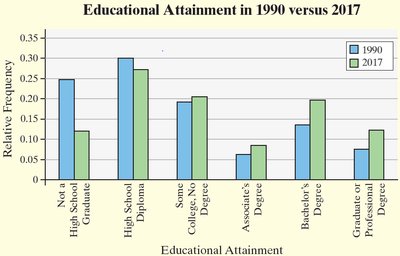
Side-by-Side Bar Graphs: Used to compare two or more data sets, typically using relative frequencies for fair comparison.
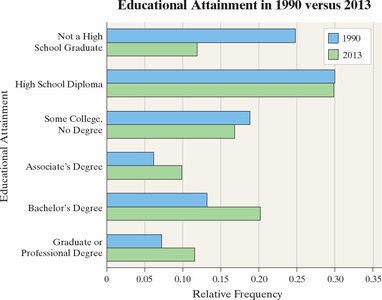
Horizontal Bar Graphs: Useful when category names are lengthy.
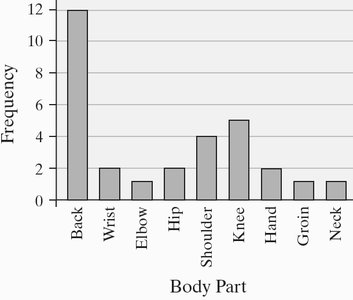
Example: Frequency bar graph for body part injuries:
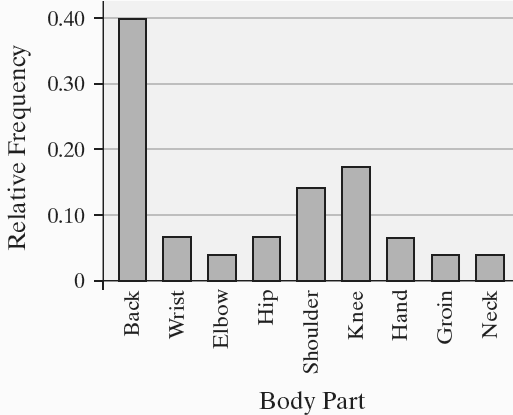
Example: Relative frequency bar graph for body part injuries:
Example: Pareto chart for body part injuries:
Example: Side-by-side bar graph comparing educational attainment in 1990 and 2017:
Example: Horizontal bar graph for educational attainment:
Pie Charts
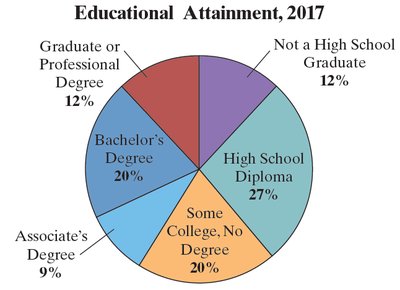
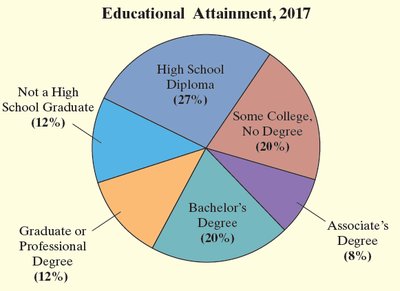
A pie chart is a circular graph divided into sectors, each representing a category. The area of each sector is proportional to the frequency or relative frequency of the category.
Degree measure for each sector is calculated as:
Example: Pie chart for educational attainment in 2017:
Organizing Quantitative Data: The Popular Displays
Discrete vs. Continuous Data
Quantitative data can be discrete (countable values) or continuous (measurable values within an interval). The method of organization depends on the type and number of values.
Discrete data with few values: Use categories as observations.
Discrete data with many values or continuous data: Group into classes using intervals.
Frequency and Relative Frequency Tables for Discrete Data
Discrete data can be summarized in frequency and relative frequency tables.
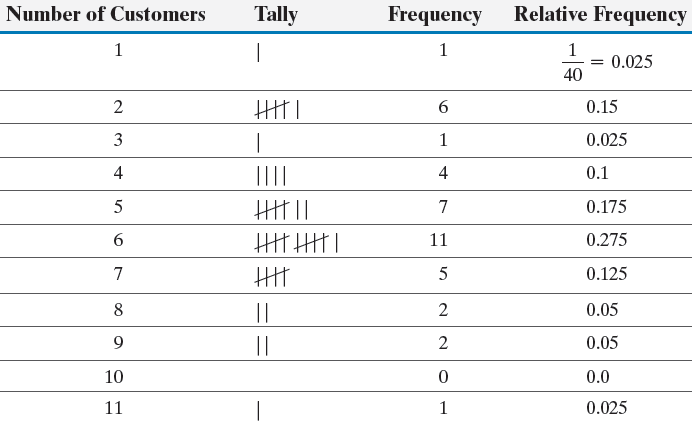
Histograms
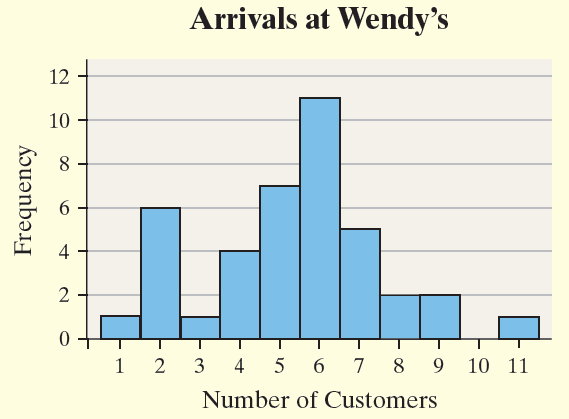
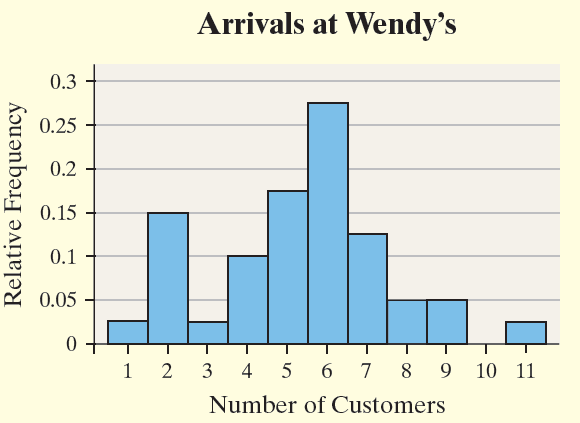
A histogram is a graphical display of quantitative data. Rectangles represent classes, with height indicating frequency or relative frequency. Rectangles touch each other, emphasizing the continuous nature of the data.
Example: Histogram for arrivals at Wendy's:
Example: Relative frequency histogram for arrivals at Wendy's:
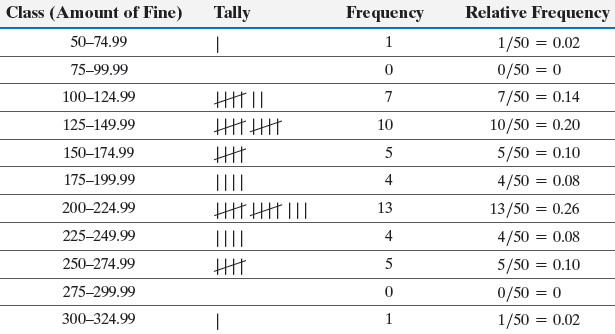
Frequency and Relative Frequency Tables for Continuous Data
Continuous data is grouped into classes defined by intervals. Each class has a lower-class limit (smallest value) and upper-class limit (largest value). The class width is the difference between consecutive lower-class limits.
Guidelines: Choose the smallest observation or a convenient number as the lower-class limit. Decide on the number of classes (typically 5–20). Compute class width as:
Example: Frequency table for fines in New York City:
Histograms for Continuous Data
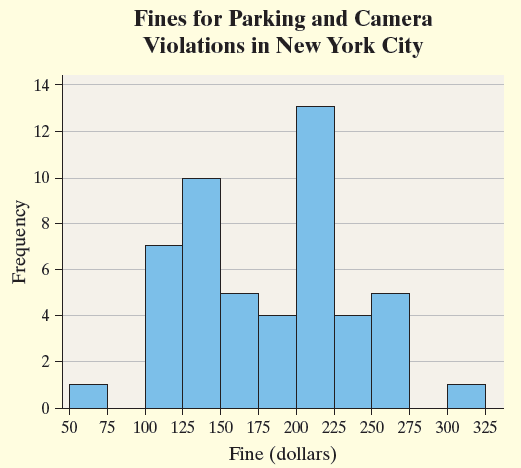
Histograms for continuous data use class intervals on the horizontal axis and frequency or relative frequency on the vertical axis.
Example: Histogram for fines in New York City:
Dot Plots
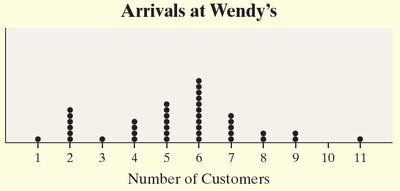
A dot plot displays each observation as a dot above its value on a horizontal axis. It is useful for small data sets and shows the distribution of data.
Example: Dot plot for arrivals at Wendy's:
Identifying the Shape of a Distribution
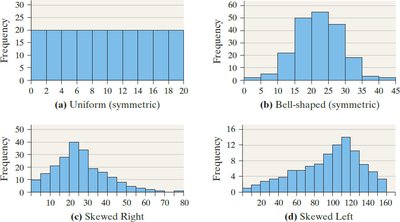
The shape of a distribution describes how data values are spread. Common shapes include:
Uniform: Frequencies are evenly spread.
Bell-shaped: Highest frequency in the middle, tails off on both sides.
Skewed Right: Right tail is longer.
Skewed Left: Left tail is longer.
Example: Shapes of distributions:
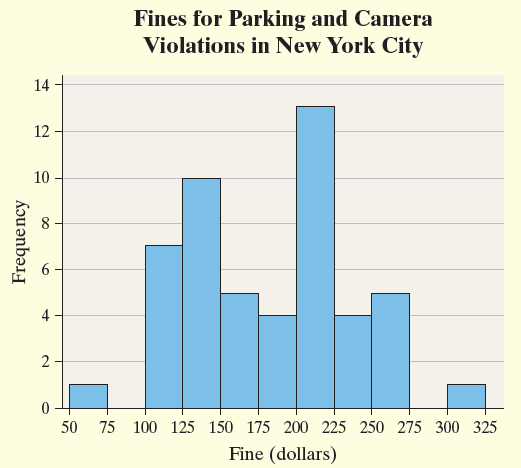
Example: Histogram for fines in New York City (shape identification):
Time Series Graphs
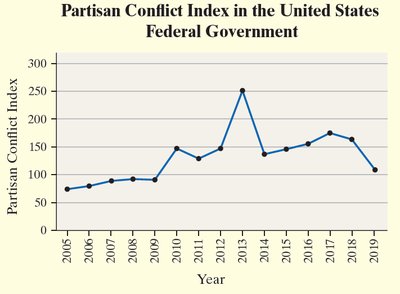
Time series data is measured at different points in time. A time-series plot shows time on the horizontal axis and the variable's value on the vertical axis, connecting points with line segments.
Example: Partisan Conflict Index in the U.S. Federal Government:
Graphical Misrepresentations of Data
Misleading and Deceptive Graphs
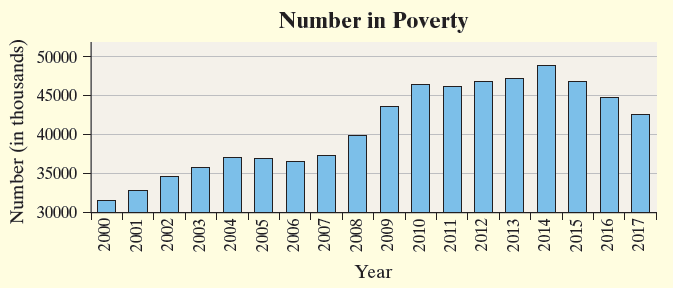
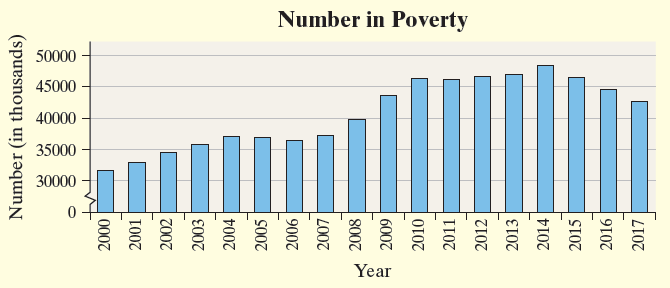
A graph is misleading if it unintentionally creates an incorrect impression, and deceptive if it purposely does so. Common issues include improper scaling, inconsistent scales, and misplaced origins. Always ensure increments between tick marks are constant and scales are comparable.
Example: Misleading time-series graph for number in poverty (origin not at zero):
Example: Corrected time-series graph for number in poverty (origin at zero):
Pie Chart Misrepresentation
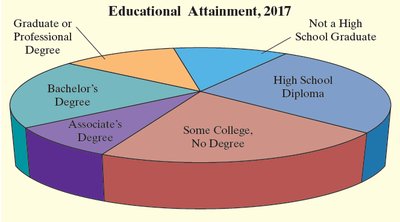
Pie charts can exaggerate or minimize categories by manipulating sector sizes or using three-dimensional effects.
Example: Misleading pie chart exaggerating 'Some College, No Degree':
Example: Accurate pie chart for educational attainment:
Guidelines for Constructing Good Graphics
Title and label axes clearly, including units and data sources.
Avoid distortion and never misrepresent data.
Minimize white space and avoid clutter.
Avoid three-dimensional effects and multiple designs in one graphic.
Let the data speak for themselves; avoid forcing attention to specific areas.
Use relative graphs only when accompanied by data or scales.
