 뒤로
뒤로Describing the Relationship Between Two Variables: Correlation, Regression, and Contingency Tables
스터디 가이드 - 스마트 노트
 자료에 맞춘 맞춤형 노트, 핵심 정의, 예시, 맥락을 확장해 제공합니다.
Describing the Relationship Between Two Variables
Correlation
Correlation measures the strength and direction of a linear relationship between two quantitative variables. The response variable is the variable of interest, while the explanatory variable is thought to explain changes in the response variable. If a numeric relationship exists, the variables are said to be correlated.
Correlation Coefficient (r): Ranges from -1 to 1. Values near 1 indicate a strong positive linear relationship, values near -1 indicate a strong negative linear relationship, and values near 0 indicate no linear relationship.
Positive Association: As one variable increases, so does the other (r > 0).
Negative Association: As one variable increases, the other decreases (r < 0).
Perfect Correlation: r = 1 or r = -1 indicates a perfect linear relationship.
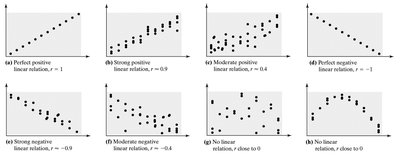
Example: A scatterplot visually displays the relationship between two variables, with each point representing an individual in the sample. The explanatory variable is plotted on the x-axis, and the response variable on the y-axis.
Scatterplots
A scatterplot is a graphical representation of the relationship between two quantitative variables. It helps to visually assess the direction, form, and strength of the relationship.
Each point represents a pair of values (x, y) for an individual.
Linear relationships appear as points clustered around a straight line.
Critical Values for r
The critical value for r depends on the sample size (n). It is the minimum value r must have for the correlation to be considered statistically significant. For example, with n = 8, the critical value is approximately 0.707.
Examples of Correlation
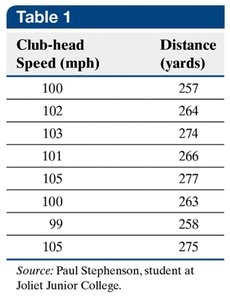
Golf Example: The following table shows the relationship between club-head speed and driving distance.
Club-head Speed (mph) | Distance (yards) |
|---|---|
100 | 257 |
102 | 264 |
103 | 274 |
101 | 266 |
105 | 277 |
100 | 263 |
99 | 258 |
105 | 275 |
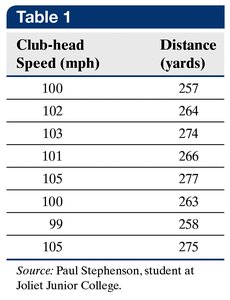
The correlation coefficient for this data is r = 0.939, indicating a strong positive association.
Generic Example: The following table shows a negative correlation between x and y.
x | y |
|---|---|
1 | 18 |
3 | 13 |
3 | 9 |
6 | 6 |
7 | 4 |
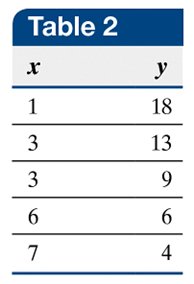
The correlation coefficient is r = -0.946, indicating a strong negative association.
Residuals
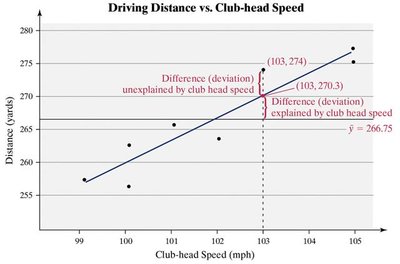
A residual is the difference between the observed value of the response variable and the value predicted by the regression line for a given explanatory variable. Residuals help assess how well the regression line fits the data.
Residual = Observed y - Predicted y ( y - \hat{y} )
The best-fitting line minimizes the sum of squared residuals.
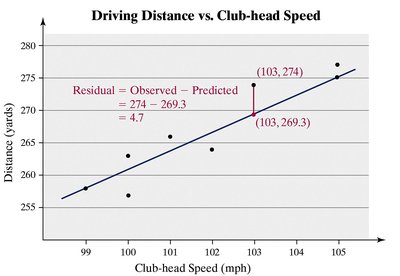
Example: For a club-head speed of 103 mph, the observed distance is 274 yards, and the predicted distance is 269.3 yards. The residual is 4.7 yards.
Regression Line (Least-Squares Line)
The least-squares regression line is the line that minimizes the sum of squared residuals. Its equation is:
Equation:
Slope:
Intercept:
Where and are the sample standard deviations, and and are the sample means.
Example (Generic Data): For Table 2, the regression line is .
Example (Golf Data): For Table 1, the regression line is .
Interpreting the Regression Line
The regression line can be interpreted in two main ways:
As an estimate of the average value of y for a given x.
As a prediction of y for a specific value of x.
The slope indicates the average change in y for a one-unit increase in x. The intercept is the predicted value of y when x = 0, but should only be interpreted if x = 0 is meaningful and within the range of the data.
Example: For the golf data, means that for each 1 mph increase in swing speed, the distance increases by 3.2 yards on average.
Cautions in Regression Analysis
Predictions made far outside the range of observed data (extrapolation) are unreliable because the relationship may not hold beyond the observed values.
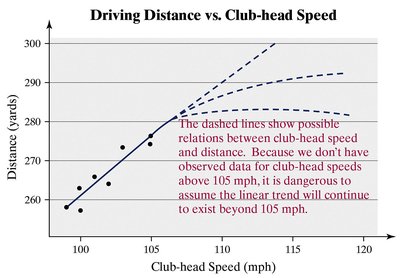
Example: Predicting the distance for a club-head speed of 140 mph is not valid if the highest observed speed is 105 mph.
Total Variation and Coefficient of Determination (R2)
The total variation in the response variable is the difference between each observed value and the mean. The coefficient of determination () measures the proportion of total variation explained by the regression line:
ranges from 0 to 1.
means the regression line explains none of the variation.
means the regression line explains all the variation.
Residual Plots
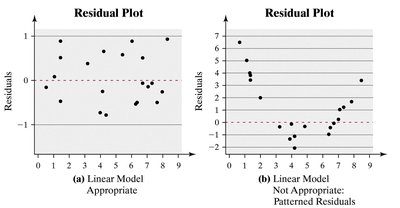
A residual plot is a scatterplot of residuals versus the explanatory variable. It helps assess whether a linear model is appropriate:
If residuals are randomly scattered, a linear model is appropriate.
If there is a pattern, a linear model may not be suitable.
Constant error variance (homoscedasticity) is required for valid regression analysis.
Influential Observations and Outliers
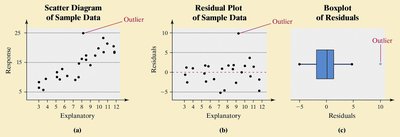
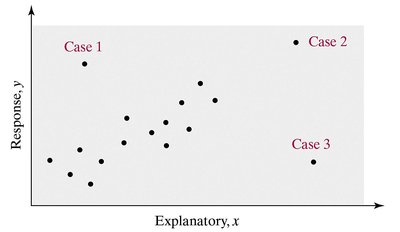
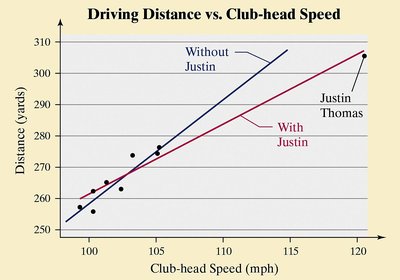
Outliers are points that do not follow the trend of the other data. Influential observations are points that, if removed, would significantly change the regression line.
Identified on scatterplots, residual plots, or by examining residuals outside the fences in a boxplot.
Test influence by removing the point and recalculating the regression line.
Contingency Tables and Categorical Data
Contingency Table (Two-Way Table)
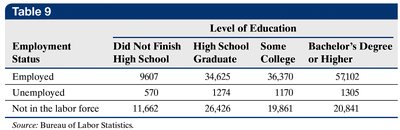
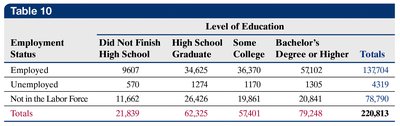
A contingency table displays the frequency distribution of two categorical variables. Rows represent one variable, columns represent another.
Marginal Distribution
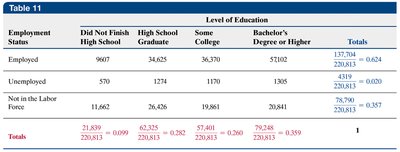
The marginal distribution is the frequency or relative frequency of a single variable, found by summing across rows or columns.
Conditional Distribution
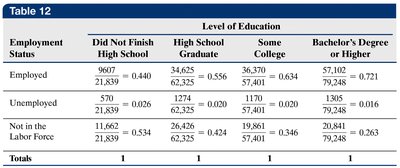
A conditional distribution shows the relative frequency of one variable for a specific value of another variable. It helps to compare categories within the context of another variable.
Simpson’s Paradox
Simpson’s Paradox occurs when an association between two variables reverses or disappears when a third variable is considered. This highlights the importance of considering all relevant variables in data analysis.
