 뒤로
뒤로Exploring Data with Tables and Graphs: Introductory Statistics Study Notes
스터디 가이드 - 스마트 노트
 자료에 맞춘 맞춤형 노트, 핵심 정의, 예시, 맥락을 확장해 제공합니다.
Exploring Data with Tables and Graphs
Overview
This chapter introduces various graphical methods for organizing, summarizing, and interpreting data in statistics. Understanding these visual tools is essential for effectively communicating statistical findings and identifying patterns, trends, and potential misrepresentations in data.
Frequency Distributions for Organizing and Summarizing Data
Definition and Purpose
A frequency distribution is a table that displays the frequency, or count, of each value or group of values in a dataset. It helps organize raw data into a more understandable format, making it easier to identify patterns and trends.
Class intervals: Grouping data into ranges (intervals) for easier analysis.
Frequency: The number of data values within each interval.
Relative frequency: The proportion or percentage of data values in each interval.
Example: A frequency distribution of pulse rates might show how many individuals fall into each pulse rate interval.
Graphs that Enlighten: Dotplots
Dotplots
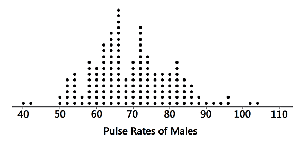
A dotplot is a simple graph for quantitative data where each data value is represented by a dot above a horizontal scale. Dots for equal values are stacked vertically.
Displays the shape of the data distribution.
Allows for reconstruction of the original data values.
Example: Dotplot of pulse rates of males.
Graphs that Enlighten: Stemplots (Stem-and-Leaf Plots)
Stemplots
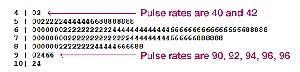
A stemplot (or stem-and-leaf plot) represents quantitative data by splitting each value into a "stem" (typically the leftmost digit) and a "leaf" (typically the rightmost digit).
Shows the shape of the data distribution.
Retains original data values.
Data are sorted in order.
Example: Stemplot of pulse rates.
Time-Series Graphs
Time-Series Graphs
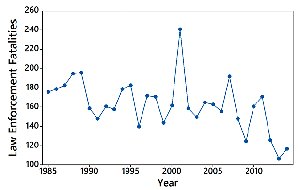
A time-series graph displays quantitative data collected at different points in time, such as monthly or yearly measurements. It is useful for identifying trends, cycles, and patterns over time.
Reveals information about trends and changes over time.
Example: Law enforcement fatalities over several years.
Bar Graphs
Bar Graphs
A bar graph uses bars of equal width to show frequencies of categories of categorical (qualitative) data. Bars may be separated by gaps.
Shows the relative distribution of categorical data.
Facilitates comparison between categories.
Pareto Charts
Pareto Charts
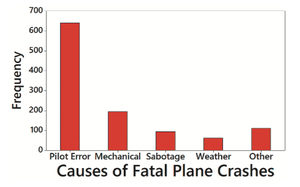
A Pareto chart is a bar graph for categorical data, with bars arranged in descending order of frequency. This highlights the most important categories.
Shows the relative distribution of categorical data.
Draws attention to the most significant categories.
Example: Causes of fatal plane crashes.
Pie Charts
Pie Charts
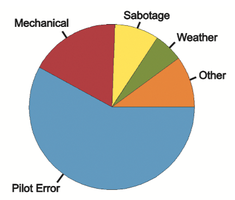
A pie chart depicts categorical data as slices of a circle, with each slice proportional to the frequency of the category.
Shows the distribution of categorical data in a familiar format.
Example: Pie chart of causes of fatal plane crashes.
Frequency Polygons
Frequency Polygons
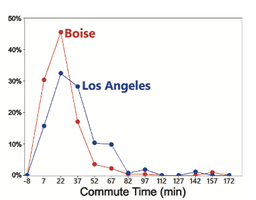
A frequency polygon is a graph that uses line segments connected to points above class midpoints to show the distribution of data. It is similar to a histogram but uses lines instead of bars.
Can be used to compare distributions.
Relative frequency polygons use proportions or percentages for the vertical scale.
Example: Relative frequency polygons for daily commute times in Los Angeles and Boise.
Graphs That Deceive
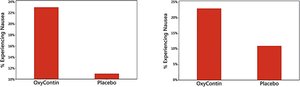
Nonzero Vertical Axis
Graphs can be deceptive if the vertical axis does not start at zero, exaggerating differences between groups. Always check the axis scale to avoid misinterpretation.
Example: Comparison of graphs with nonzero vertical axes.
Pictographs
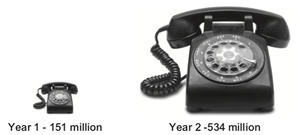
Pictographs use images to represent data, but can be misleading. When one-dimensional data are depicted with two- or three-dimensional objects, differences can be exaggerated due to geometric scaling.
Doubling the sides of a square increases area by a factor of four.
Doubling the sides of a cube increases volume by a factor of eight.
Example: Pictograph of U.S. National Security Agency collected phone records.
Concluding Thoughts
Principles for Effective Graphs
For small data sets (20 values or fewer), use a table instead of a graph.
Graphs should focus on the true nature of the data, not on distracting design features.
Do not distort data; construct graphs to reveal the true nature of the data.
Most of the ink in a graph should be used for the data, not for other design elements.
Additional info: These principles are based on Edward Tufte's guidelines for the visual display of quantitative information.
