Probabilities & Z-Scores w/ Graphing Calculator quiz #1 Flashcards

Probabilities & Z-Scores w/ Graphing Calculator quiz #1
Control buttons has been changed to "navigation" mode.
1/10
  • What is a z-score and what does it represent in the context of the standard normal distribution?
    A z-score represents the number of standard deviations an observation is from the mean in a standard normal distribution. It indicates how far and in what direction (above or below the mean) a value lies relative to the mean.
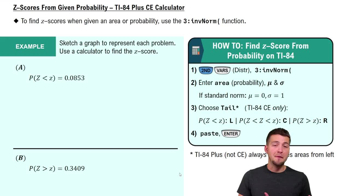
  • How do you find the z-score corresponding to a given probability (area) to the left under the standard normal curve using a graphing calculator?
    To find the z-score for a given probability to the left under the standard normal curve, use the inverse normal function on a TI-84 calculator. Enter the probability as the area, set the mean to 0 and standard deviation to 1, and select the left tail. The calculator will output the corresponding z-score.
  • What is the process called when you convert raw observations into z-scores in statistics?
    Converting raw observations into z-scores is called standardization.
  • Describe the steps to find the z-score such that the area under the standard normal curve to the left is 0.52 using a TI-84 calculator.
    To find the z-score with area 0.52 to the left, use the inverse normal function on the TI-84 calculator. Enter 0.52 as the area, set the mean to 0 and standard deviation to 1, and select the left tail. The calculator will provide the z-score corresponding to this area.
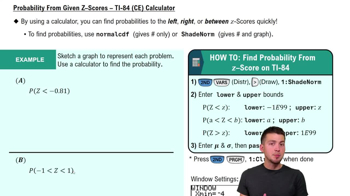
  • How do you use a TI-84 calculator to find the probability that a standard normal variable falls between two z-scores?
    To find the probability that a standard normal variable falls between two z-scores, use the normalcdf function on the TI-84 calculator. Enter the lower and upper z-score bounds, set the mean to 0 and standard deviation to 1, and the calculator will output the probability for that interval.
  • Explain how to find a z-score when given a probability to the right of a value using a TI-84 calculator.
    To find a z-score for a probability to the right, use the inverse normal function on the TI-84 calculator. Enter the probability as the area, set the mean to 0 and standard deviation to 1, and select the right tail. The calculator will output the corresponding z-score.
  • What is the purpose of using the 'shade normal' function on a TI-84 calculator when working with the standard normal distribution?
    The 'shade normal' function visually displays the area under the curve corresponding to the probability you are calculating. This helps confirm your setup and reduces the chance of mistakes compared to only using numerical output.
  • How do you input negative infinity as a lower bound when using the normalcdf function on a TI-84 calculator?
    You input negative infinity as the lower bound by entering -1e99 on the calculator. This represents a very large negative number, effectively simulating negative infinity for calculations.
  • What adjustment must you make when using a regular TI-84 Plus (not CE) to find a z-score for a right-tail probability?
    You must convert the right-tail probability to a left-tail probability by subtracting it from 1 before entering it into the inverse normal function. This is because the regular TI-84 Plus always assumes the area entered is to the left of the z-score.
  • Why is it helpful to sketch a graph before using the calculator to solve normal distribution problems?
    Sketching a graph helps you visualize the area or probability you are calculating and anticipate whether the z-score should be positive or negative. This step can prevent input errors and confirm that your calculator results make sense.