Skip to main content
Introductory Statistics
My Course
Learn
Exam Prep
AI Tutor
Study Guides
Textbook Solutions
Flashcards
Explore
Try the app
My Course
Learn
Exam Prep
AI Tutor
Study Guides
Textbook Solutions
Flashcards
Explore
Try the app
Back
Using Matrices on a TI-84 quiz
You can tap to flip the card.
What is the first step to access the matrix menu on a TI-84 calculator?
You can tap to flip the card.
👆
What is the first step to access the matrix menu on a TI-84 calculator?
Press the '2nd' button, then the 'x^-1' button (which has 'MATRIX' above it) to access the matrix menu.
Track progress
Control buttons has been changed to "navigation" mode.
1/15
Related flashcards
Related practice
Recommended videos
Using Matrices on a TI-84 definitions
Using Matrices on a TI-84
15 Terms
13. Chi-Square Tests & Goodness of Fit
4 topics
5 problems
Chapter
Guided course
02:22
Using Matrices on a TI-84 Example 1
153
views
3
rank
Guided course
03:56
Using Matrices on a TI-84
204
views
4
rank
Terms in this set (15)
Hide definitions
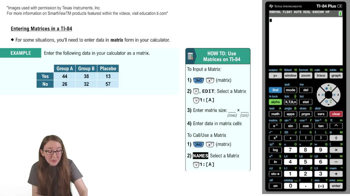
What is the first step to access the matrix menu on a TI-84 calculator?
Press the '2nd' button, then the 'x^-1' button (which has 'MATRIX' above it) to access the matrix menu.
How do you navigate to the edit menu for matrices on the TI-84?
Scroll right to the 'EDIT' menu after entering the matrix menu, then press 'ENTER' on the matrix you want to edit.
What information must you enter to define the size of a matrix on the TI-84?
You must enter the number of rows first, followed by the number of columns to match your data table.
Why is it important to match the matrix dimensions to your data table?
Matching dimensions ensures that each value from your data table corresponds to the correct cell in the matrix.
How do you enter data into a matrix once its size is set on the TI-84?
Input each value in the matrix, pressing 'ENTER' after each entry to move to the next cell.
What should you do after entering all your data into the matrix?
Double-check that all values in the matrix match the corresponding cells in your data table.
How do you return to the main viewing window from the matrix editor on the TI-84?
Press '2nd' and then 'MODE' (which has 'QUIT' above it) to return to the main viewing window.
What steps are needed to call or use a matrix from the main viewing window?
Press '2nd' and 'x^-1' to access the matrix menu, select the matrix by name, and press 'ENTER' to display it.
How can you verify you have selected the correct matrix to call?
Check the matrix's dimensions displayed next to its name in the matrix menu.
What happens when you press 'ENTER' after selecting a matrix to call?
The matrix appears in the viewing window, showing all its values.
Why is accurate data entry into matrices important for statistical analysis?
Accurate entry ensures correct alignment of data, which is crucial for valid calculations and analysis.
How does using matrices on a TI-84 support statistical tasks like regression?
Matrices organize data efficiently, making it easier to perform calculations such as regression and variance analysis.
What statistical concept can be better understood by mastering matrix operations?
Mastery of matrix operations enhances understanding of concepts like the coefficient of variation.
How does the TI-84 matrix feature facilitate handling categorical data?
It allows you to organize and manipulate categorical data in a structured format for analysis.
What is a recommended practice after entering a matrix before using it for calculations?
Review the matrix to ensure all values are correct and correspond to the original data table.
 BackBack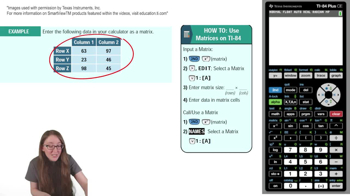
 02:22
02:22