Which Excel function is used to find the cumulative probability for a given z-score in the standard normal distribution?
The function =NORM.S.DIST(z, TRUE) is used to find the cumulative left-tail probability for a given z-score in the standard normal distribution.
What does the 'cumulative' argument in =NORM.S.DIST and =NORM.DIST need to be set to when finding probabilities?
The 'cumulative' argument should always be set to TRUE to find cumulative (left-tail) probabilities.
How do you use Excel to find the probability that a standard normal variable is less than -1.5?
You use =NORM.S.DIST(-1.5, TRUE), which returns about 0.07, meaning a 7% chance.
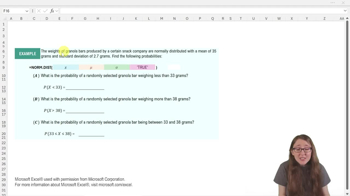
Which Excel function allows you to find the cumulative probability for a given x-value in a normal distribution with any mean and standard deviation?
The function =NORM.DIST(x, mean, standard_dev, TRUE) is used for this purpose.
If you want to find the probability that a normally distributed variable is greater than a certain value, which rule should you use?
You should use the complement rule: 1 minus the left-tail probability found with =NORM.DIST.
How do you find the probability that a batch takes longer than 12.5 minutes to bake if the mean is 11 and standard deviation is 0.76?
Calculate 1 - NORM.DIST(12.5, 11, 0.76, TRUE), which gives the right-tail probability.
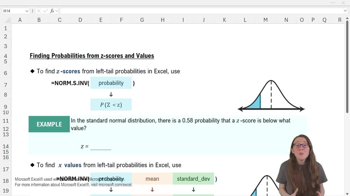
Which Excel function is used to find the z-score corresponding to a given cumulative probability in the standard normal distribution?
The function =NORM.S.INV(probability) is used to find the z-score for a left-tail probability.
What must the probability input for =NORM.S.INV or =NORM.INV always represent?
It must always be a left-tail probability (the probability of being below a certain value).
How do you find the z-score below which 58% of values lie in the standard normal distribution using Excel?
Use =NORM.S.INV(0.58), which returns approximately 0.202.
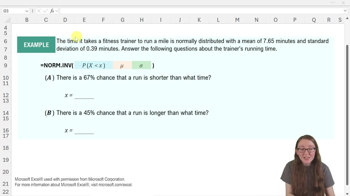
Which Excel function is used to find the x-value corresponding to a given cumulative probability in a normal distribution with any mean and standard deviation?
The function =NORM.INV(probability, mean, standard_dev) is used for this.
If you are given a right-tail probability, how do you convert it to a left-tail probability for use in =NORM.INV?
Subtract the right-tail probability from 1 to get the left-tail probability.
How would you use Excel to find the song length below which 33% of songs fall, given a mean of 3.56 and standard deviation of 0.32?
Use =NORM.INV(0.33, 3.56, 0.32), which returns approximately 3.419.
How do you find the song length above which 20% of songs fall, given a mean of 3.56 and standard deviation of 0.32?
Use =NORM.INV(1-0.2, 3.56, 0.32), which returns approximately 3.829.
Why is it important to check whether a probability is a left-tail or right-tail probability before using Excel's normal distribution functions?
Because Excel's functions require left-tail probabilities; right-tail probabilities must be converted using the complement rule.
What is the main advantage of using Excel's normal distribution functions for probability and value calculations?
They allow direct calculation of probabilities and values without manual standardization or table lookups, streamlining statistical analysis.
 Back
Back
 08:09
08:09