How to Streamline Life with Online Tools: A Guide for Busy College Students
College is hectic—especially when you're a full-time student working multiple jobs like me. Between lectures, assignments, meetings, and personal responsibilities, I was constantly worrying about the clock. I found myself sacrificing sleep and social time just to keep up.
I then realized that I didn’t just want to survive semesters—I wanted to thrive. That’s when I turned to online tools and discovered how they could help me better manage my time.
Step 1: Sync Your Calendars
Setting up an online calendar should be your first step. I synced my class schedule and assignment due dates so I could see everything in one place. The process is simple:
- In Canvas (or your learning management system), locate the Calendar view.
- Find the Calendar Feed link (this is usually at the bottom).
- Copy that link and paste it into your preferred calendar app (Outlook, Google Calendar, or Apple Calendar). This option to integrate calendars is usually located in the settings of your calendar application.
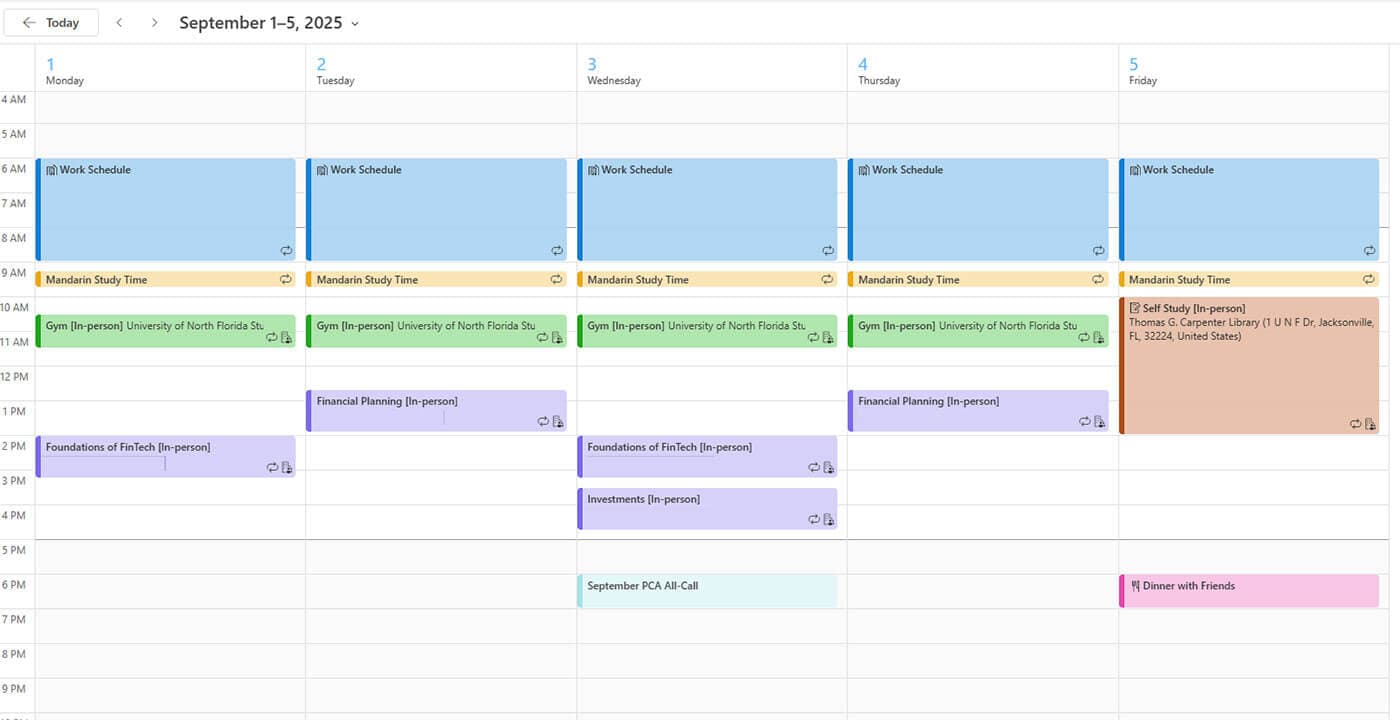
I use Microsoft Outlook because my work and school organizations use the Microsoft Office ecosystem. I use color-coded categories—classes, work shifts, and personal activities—so I can quickly view my week and know what needs to be done.
My calendar has become my most-used productivity tool. It helps me avoid scheduling conflicts and gives me a clear picture of how to best allocate my time.
Step 2: Centralize Communication
Next, create a central place for all your meetings and conversations. I chose Microsoft Teams because it was already used in a couple of my jobs.
Teams helps me stay on top of scheduling collaborative work and events. This includes check-ins with co-workers, group project meetings, and trip planning with friends. I can also schedule meetings directly through Outlook, which syncs seamlessly with Teams.
If you aren’t into Teams, consider using Google Meet, Slack, or Zoom, as these platforms offer similar functionality. The key is to pick one platform and stick with it. Consistency across your platforms and ecosystems will make these tools more effective.
Step 3: Collect Your Thoughts
Finally, you should fully utilize a digital notebook. Microsoft OneNote has become my digital thought pad. I use it to jot down ideas, organize class notes, track tasks, and draft discussion board responses.
I created separate notebooks for each job and class. Since I can access them from any device, I never have to worry about leaving a physical notebook behind.
Other great platform alternatives include Notion, Google Keep, and Apple Notes. Each has its strengths, so choose what fits your workflow best.
Final Takeaway: Keep It Together
Microsoft tools are my personal choice, but you should choose the platform that works best for you. Whether you prefer Google, Apple, or another ecosystem, the goal is the same: to combine your academic, professional, and personal responsibilities into one system.
Effective time management isn’t just about staying busy—it’s about creating intentional balance. Streamlining my life with online tools has reduced my stress, and I’m now able to better utilize my time.
Syncing my calendars, centralizing communication, and capturing my thoughts digitally have been key to my time management success. If you're managing a full course load, multiple jobs, or other responsibilities, give these tools a try. They can help you better manage your schedule and create the efficiency you need to succeed.
Do you have a compelling story or student success tips you’d like to see published on the Pearson Students blog? If you are a college student and interested in writing for us – click here to pitch your idea and get started!
About the author

David Rodebaugh
David Rodebaugh is a Finance and International Business major at the University of North Florida. He serves as the Pearson Campus Ambassador at UNF, works as a Financial Planning & Analysis intern at Reliance Worldwide Corporation, and is a manager at an independent theater. He aspires to pursue a career in finance, where he can help organizations make smarter decisions, optimize performance, and operate with greater efficiency. Outside of academics and work, David is passionate about hiking, volunteering, and spending quality time with friends and family.