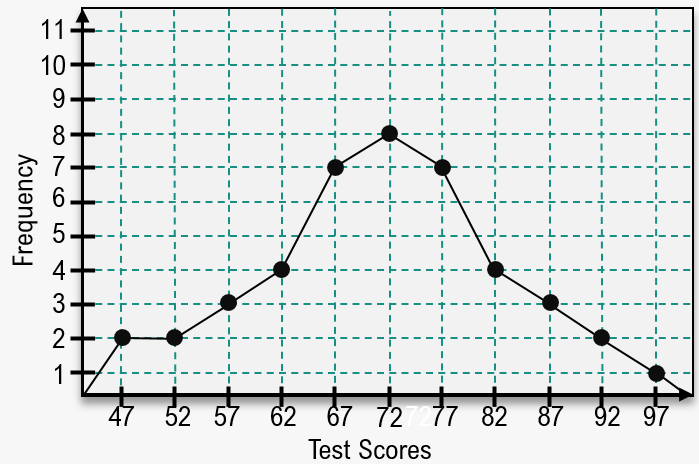
use the frequency polygon to identify the class with the greatest, and the class with the least, frequency.
Table of contents
- 1. Intro to Stats and Collecting Data1h 14m
- 2. Describing Data with Tables and Graphs1h 55m
- 3. Describing Data Numerically2h 5m
- 4. Probability2h 16m
- 5. Binomial Distribution & Discrete Random Variables3h 6m
- 6. Normal Distribution and Continuous Random Variables2h 11m
- 7. Sampling Distributions & Confidence Intervals: Mean3h 23m
- Sampling Distribution of the Sample Mean and Central Limit Theorem19m
- Distribution of Sample Mean - Excel23m
- Introduction to Confidence Intervals15m
- Confidence Intervals for Population Mean1h 18m
- Determining the Minimum Sample Size Required12m
- Finding Probabilities and T Critical Values - Excel28m
- Confidence Intervals for Population Means - Excel25m
- 8. Sampling Distributions & Confidence Intervals: Proportion2h 10m
- 9. Hypothesis Testing for One Sample5h 6m
- Steps in Hypothesis Testing1h 6m
- Performing Hypothesis Tests: Means1h 4m
- Hypothesis Testing: Means - Excel42m
- Performing Hypothesis Tests: Proportions37m
- Hypothesis Testing: Proportions - Excel27m
- Performing Hypothesis Tests: Variance12m
- Critical Values and Rejection Regions28m
- Link Between Confidence Intervals and Hypothesis Testing12m
- Type I & Type II Errors15m
- 10. Hypothesis Testing for Two Samples4h 50m
- Two Proportions1h 13m
- Two Proportions Hypothesis Test - Excel28m
- Two Means - Unknown, Unequal Variance1h 3m
- Two Means - Unknown Variances Hypothesis Test - Excel12m
- Two Means - Unknown, Equal Variance15m
- Two Means - Unknown, Equal Variances Hypothesis Test - Excel9m
- Two Means - Known Variance12m
- Two Means - Sigma Known Hypothesis Test - Excel21m
- Two Means - Matched Pairs (Dependent Samples)42m
- Matched Pairs Hypothesis Test - Excel12m
- 11. Correlation1h 24m
- 12. Regression3h 33m
- Linear Regression & Least Squares Method26m
- Residuals12m
- Coefficient of Determination12m
- Regression Line Equation and Coefficient of Determination - Excel8m
- Finding Residuals and Creating Residual Plots - Excel11m
- Inferences for Slope31m
- Enabling Data Analysis Toolpak1m
- Regression Readout of the Data Analysis Toolpak - Excel21m
- Prediction Intervals13m
- Prediction Intervals - Excel19m
- Multiple Regression - Excel29m
- Quadratic Regression15m
- Quadratic Regression - Excel10m
- 13. Chi-Square Tests & Goodness of Fit2h 21m
- 14. ANOVA1h 57m
2. Describing Data with Tables and Graphs
Frequency Polygons
Struggling with Statistics?
Join thousands of students who trust us to help them ace their exams!Watch the first videoMultiple Choice
Using the frequency polygon below, what range of test scores was most popular?

A
72
B
70-74
C
70.5-74.5
D
67-77
Verified step by step guidance1
Step 1: Observe the frequency polygon provided in the image. A frequency polygon is a graphical representation of data where points are plotted at the midpoints of intervals and connected by straight lines.
Step 2: Identify the peak of the frequency polygon, which represents the interval with the highest frequency. In this case, the peak occurs at the test score interval centered around 72, where the frequency is 9.
Step 3: Determine the range of test scores corresponding to the interval around the peak. The interval is typically defined by the boundaries of the class or bin. For example, if the midpoint is 72, the range could be 70-74 or 70.5-74.5 depending on the bin width.
Step 4: Consider the options provided in the problem. Match the interval containing the peak frequency to the correct range of test scores. The most popular range is the one that includes the midpoint of 72.
Step 5: Verify the interpretation of the frequency polygon and ensure the selected range aligns with the graphical data. The range with the highest frequency is the answer.
Watch next
Master Creating Frequency Polygons with a bite sized video explanation from Patrick
Start learningRelated Videos
Related Practice
Textbook Question
Frequency Polygons practice set